AI Agent Skills: What They Are & How to Create Them
Discover what AI agent skills are, how progressive disclosure works, and learn to build custom reusable skills.
Table of contents
What Is an AI Agent Skill?
An agent skill is a reusable set of instructions — a standardised procedure that tells an agent how to do a particular kind of task well. It consists of a single Markdown file, SKILL.md, and can bundle any other files the task requires, such as reference documents, templates, or executable scripts.
Take the grill-me skill as an example:
---
name: grill-me
description: Interview the user relentlessly about a plan or design until reaching shared understanding, resolving each branch of the decision tree. Use when user wants to stress-test a plan, get grilled on their design, or mentions "grill me".
---

Interview me relentlessly about every aspect of this plan until we reach a shared understanding. Walk down each branch of the design tree, resolving dependencies between decisions one-by-one. For each question, provide your recommended answer.

Ask the questions one at a time.

If a question can be answered by exploring the codebase, explore the codebase instead.
A SKILL.md file contains a small block of metadata and a body of instructions. The metadata consists of the skill's name and description, which the AI agent loads at startup.
How AI Agent Skills Work: Progressive Disclosure
Initially, only the name and description are loaded into the context. When a user's request matches a skill's description, the body of instructions is loaded into the same context.
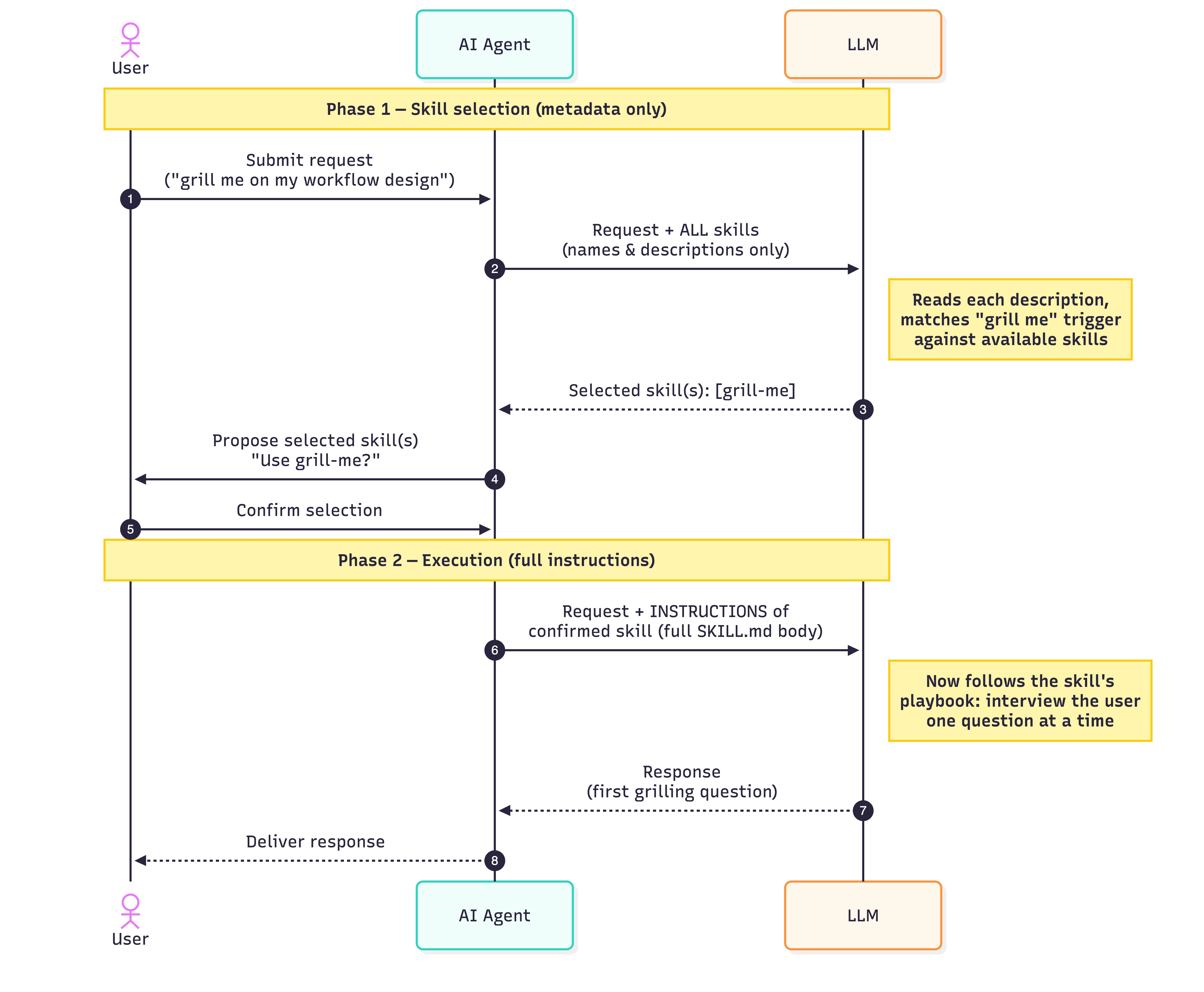
Let's look at how the grill-me skill is used.
Step-by-Step
- Request — The user asks the agent for something ("grill me on my workflow design").
- Selection prompt — The user's request, along with the descriptions of all available skills, is sent to the LLM.
- LLM selects — The LLM compares the request to each description and returns the skill(s) that match.
- Confirmation — The agent surfaces the proposed skill(s) back to the user, who confirms (or rejects/adjusts) the choice.
- Instructions loaded — The agent fetches the full instructions for the confirmed skill: the
SKILL.mdbody. - Execution prompt — The user's request plus the selected skill's instructions is sent to the LLM.
- Response — The LLM produces the output, which is the first grilling question.
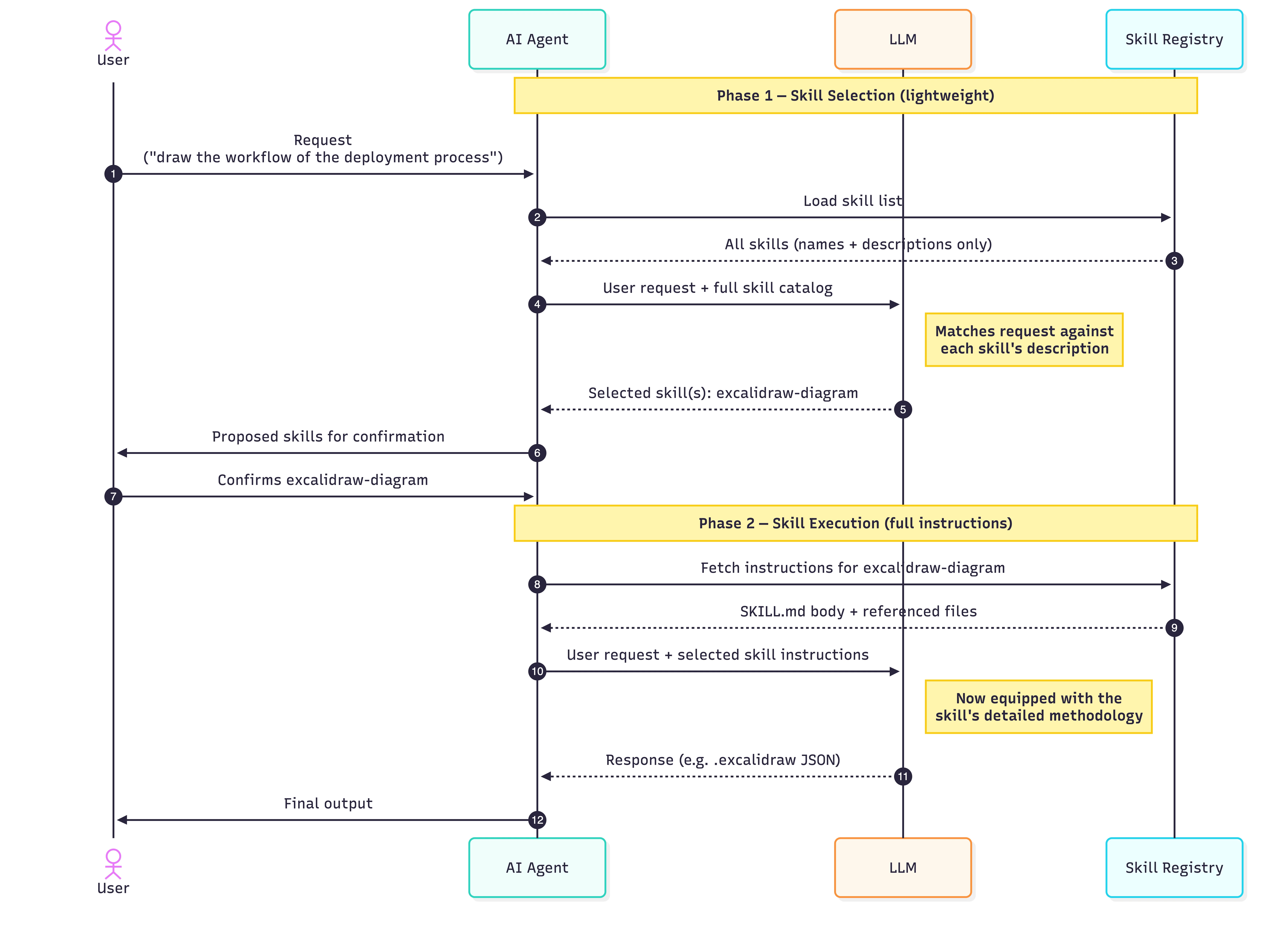
Now let's use excalidraw-diagram-skill to illustrate how a skill with a reference document is used:
Step-by-Step
- Request — The user asks the agent for something ("draw the workflow of the deployment process").
- Selection prompt — The user's request, along with the descriptions of all available skills, is sent to the LLM.
- LLM selects — The LLM compares the request to each description and returns the skill(s) that match. Here, "draw the workflow" matches the
excalidraw-diagramdescription, so it is selected. - Confirmation — The agent surfaces the proposed skill(s) back to the user, who confirms (or rejects/adjusts) the choice.
- Instructions loaded — The agent fetches the full instructions for the confirmed skill: the
SKILL.mdbody and any referenced files (forexcalidraw-diagram, that includes the colour palette, JSON schema, and element templates). - Execution prompt — The user's request plus the selected skill's instructions is sent to the LLM. The model now has the detailed methodology it needs.
- Response — The LLM produces the output (an
.excalidrawJSON file), which the agent returns to the user.
AI Agent Skills vs. Tools and MCP
Skills don't replace prompts, tools, or MCP. Tools and MCP integrations extend an agent's reach to external systems — querying a database, calling an API, and so on. Skills deepen the agent's know-how for completing a task.
An MCP such as the NetSuite MCP lets an agent answer user questions by accessing live financial and operational data in NetSuite. Then a NetSuite operational-reporting skill, in turn, guides the agent on how to compose that report and present the answer as a report to the user.
Some scenarios for using skills include:
- Multi-step workflows
- Processing documents, such as extracting data from PDFs
- Code-generation standards
How to Create AI Agent Skills
- Create a folder named for the skill (e.g.
netsuite-operation-report/). - Write
SKILL.mdwith aname, a sharpdescription, and a concise body of instructions (under 200 words). - Add resources the task needs — reference docs, templates, scripts. Keep
SKILL.mdshort and link out to the details. - Install it where agents will discover it. Refer to Solving AI Agent Skills Fragmentation with npx skills for how to manage skills across multiple agents.
A few tips for writing good skills:
- Write the description for the trigger, not the human.
- Keep
SKILL.mdlean — under 200 words. Put the general case in the body; leave the edge cases to reference documents. - Use scripts for anything deterministic. Don't ask the LLM to do arithmetic.
- Version it. Check it into git.
Conclusion
Unlike tools and MCP, which define what to connect to, agent skills package how to do the work. They are an essential complement, not a replacement.
By leveraging progressive disclosure, skills keep your agent's context window clean and efficient — loading detailed instructions, reference documents, and executable scripts only when a user's request triggers them.
Related Articles
AI & Agents
Bringing Buzz to DeepSeek Harness: Taught to Speak Nostr
Integrate DeepSeek Harness with Block Buzz using a Nostr bridge. Configure NIP-42 auth, in-place message streaming, and per-channel agent workspaces.
9 MIN READ
AI & Agents
How to Expose Hermes Agent Privately with Cloudflare WARP
Learn how to securely expose and access your Hermes Agent globally using Cloudflare WARP and Zero Trust without opening inbound firewall ports.
8 MIN READ
Collaboration
Self-Host Block's Buzz: Shared AI Agent Workspace
Learn how to self-host Block's Buzz on a Linux VPS behind Cloudflare DNS. Run a secure, Nostr-powered workspace where humans and AI agents collaborate.
16 MIN READ
Previous
How to Deploy Hermes Agent on a Linux VPS
Deploy the Hermes Agent on a remote VPS for 24/7 uptime. Follow our step-by-step guide to integrate it with a custom Telegram bot.
Next
Switch Between Multiple Cloudflare WARP Orgs on Mac
Configure and switch multiple Cloudflare WARP organisations on macOS using a .mobileconfig file. A complete MDM guide for IT admins.