How AI Agent Skills Replace Nuxt App Scaffolding Scripts
Scaffold Nuxt on Cloudflare Workers easily. Learn why we replaced brittle shell scripts with AI agent skills and how to install them with npx skills.
Table of contents
When we start a new app using the Nuxt framework, we have to go through tedious steps like installing modules and setting up configurations such as nuxt.config.ts and wrangler.jsonc. A script can solve this problem, but it hits its limits as variations increase. This is why we explored and replaced scripts with an agent skill.
What Traditional Shell Scripts Are Good At
A script is good at executing a fixed set of instructions in sequence with hardcoded decisions.
#!/usr/bin/env bash
set -e

npx nuxi@latest init "$1" --template minimal --packageManager pnpm --no-gitInit -M @nuxt/ui,@nuxthub/core,@vueuse/nuxt

cd "$1"

cp ~/templates/nuxt.config.ts .
cp ~/templates/wrangler.jsonc .
This script works until the following occurs:
- Fixed defaults. The script hardcodes the Nuxt UI module; what if we want the Ant Design UI module? Every new module option requires another argument from the user.
- It can't read the user's intent. "Build me a blog" needs
@nuxt/content; "build me a website with newsletters" needs Cloudflare D1 + Drizzle. A script can't tell the difference—each variation needs a new script. - It goes stale silently. Nuxt's conventions change between major versions. Nuxt 4 changed the source directory to
app/. A script that is written for Nuxt 3 quietly scaffolds the wrong layout and never alerts the user.
App scaffolding is a decision issue, not an execution issue. The script will not scale when the number of decisions increases.
Why Use an AI Agent Skill Over Traditional Scripts?
An agent skill is not a set of code that executes, but a set of knowledge the AI agent follows. It contains SKILL.md and can bundle any other files the task requires (such as reference documents, templates, and executable scripts). The article, AI Agent Skills: What They Are & How to Create Them, explains how an agent skill works. A skill maintains a script's diligence while adding the reasonable judgements that a script lacks:
- Infers the user's intention to determine whether the app needs a database.
- Decides which optional modules are needed from the specified list. For example, Nuxt Content, i18n, and analytics are opt-in when requested by the user.
- Adapts to the current ecosystem using the latest Nuxt framework, NuxtHub for Cloudflare bindings, and Wrangler for deployment.
- Recovers when a step fails.
- Verifies against a final checklist before handing the project over.
Behind the Scenes of Our Nuxt & Cloudflare Scaffolding Skill
The skill, scaffold-nuxt-cloudflare-app-skill, walks through a production-oriented scaffold:
- Clarify anything that cannot be inferred:
- UI kit (Nuxt UI by default or Antdv Next);
- Whether a database is required (such as Cloudflare D1);
- Extra modules like
@nuxtjs/i18nor@nuxt/contentfor CMS features.
- Scaffolds the base app with
pnpm dlx nuxi@latest initfor the latest version of the Nuxt framework withpnpmas the package manager. It then sets native-build allowlists so Cloudflare's build environment can compilebetter-sqlite3/sharp. - Installs modules from a decision table:
@nuxt/uior@antdv-next/nuxt,@nuxt/image,@nuxtjs/seo,@nuxthub/core,@vueuse/nuxt, plus Drizzle/D1, Nuxt Content, and i18n only when selected. - Lays out the directory structure:
app/server/shared/tests/- root config files.
- Configures
nuxt.config.ts:site.url/site.namefor SEO- NuxtHub
hubblock for Cloudflare routeRulescompatibilityDate
- Configures
wrangler.jsonc - Sets up Vitest and ESLint, then runs a final checklist including
pnpm install && pnpm devbefore considering the job done.
Shell Scripts vs AI Agent Skills: A Side-by-Side Comparison
| Script | Skill | |
|---|---|---|
| User's intent | ❌ fixed defaults | ✅ adapts to the request |
| Decision making | only if you pre-code flags | ✅ judged at runtime |
| Version changes | manual rewrite | ✅ checks the current state |
| Error recovery | halts | ✅ fixes and continues |
| Result verification | ❌ | ✅ final checklist |
| Maintenance cost | flags sprawl, version bumps | editing Markdown, not code |
How to Install AI Agent Skills with the npx skills CLI
Installation is a single command with the skills CLI:
npx skills add https://github.com/Tech-Voyage-Dev/scaffold-nuxt-cloudflare-app-skill.git -g
The CLI clones the repo, finds the skill, and asks which of the 77 supported agents should get it:
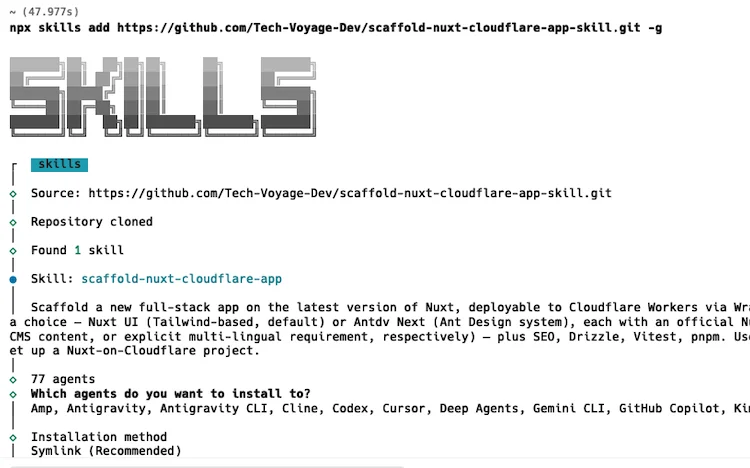
We went with Symlink (the recommended method), which installs the skill once in ~/.agents/skills and points every selected agent to this single copy.
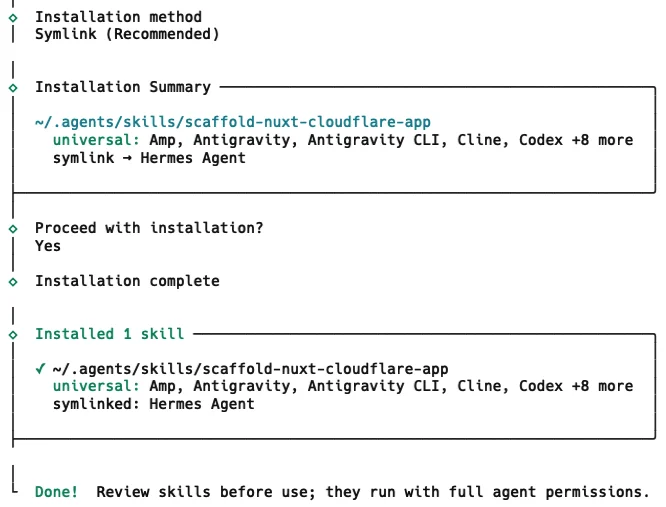
- Please refer to this article, Solving AI Agent Skills Fragmentation with npx skills, on how to centralise agent skills in a single source of truth.
Opening Claude Code confirms the skill is successfully installed.
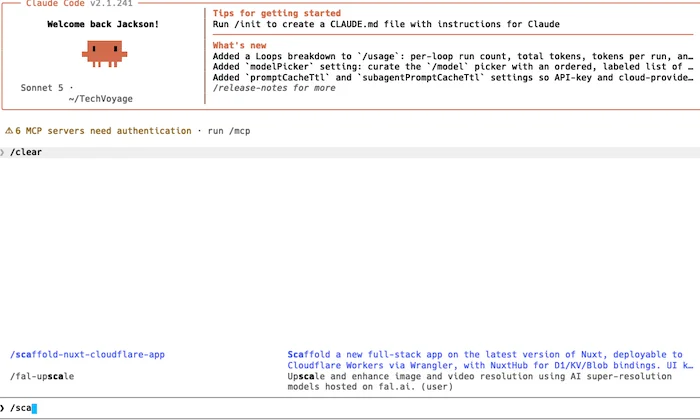
From there, a natural-language prompt is all it takes:
"Scaffold a new Nuxt app deployed to Cloudflare Workers — Nuxt UI, a blog section, and a D1 database"
The skill is open source; check out the GitHub repo and give it a try.
Related Articles
Collaboration
Self-Host Block's Buzz: Shared AI Agent Workspace
Learn how to self-host Block's Buzz on a Linux VPS behind Cloudflare DNS. Run a secure, Nostr-powered workspace where humans and AI agents collaborate.
16 MIN READ
Travel
Self-Host Your Travel Itineraries with TREK and Docker
Learn how to deploy TREK using Docker, secure it via Cloudflare R2 and Caddy, and leverage AI agents with MCP for seamless travel planning.
22 MIN READ
Cloudflare
Build a Persistent AI Memory System on Cloudflare
Learn how to build a persistent, self-hosted AI memory system on Cloudflare using Second Brain and MCP. Share context across Claude, Gemini, and Obsidian.
7 MIN READPrevious
Build a Persistent AI Memory System on Cloudflare
Learn how to build a persistent, self-hosted AI memory system on Cloudflare using Second Brain and MCP. Share context across Claude, Gemini, and Obsidian.
Next
Self-Host Your Travel Itineraries with TREK and Docker
Learn how to deploy TREK using Docker, secure it via Cloudflare R2 and Caddy, and leverage AI agents with MCP for seamless travel planning.