---
title: "使用MDM設定檔在macOS上無縫切換與設定多個Cloudflare WARP零信任組織的完整教學指南"
description: "本指南將詳細介紹如何在macOS系統上,通過使用MDM .mobileconfig設定檔,實現多個Cloudflare WARP零信任組織或帳戶之間的無縫切換。本文為企業IT系統管理員提供了一套完整的、可直接落地部署的教學指南與設定步驟範本,幫助企業輕鬆管理並確保終端用戶的網路安全、合規審計與流暢體驗。"
canonical_url: "https://techvoyage.dev/tw/article/switch-between-multiple-cloudflare-warp-orgs-on-mac"
last_updated: "2026-10-20T09:53:54.950Z"
---
## 什麼是 Cloudflare WARP?
Cloudflare WARP 是一款用戶端應用程式,它會將指定裝置的網路流量引導至 Cloudflare 的全球網路進行路由,而不是直接傳送到公共網際網路。
它基於 **WireGuard** 通訊協定建立一條加密隧道,從而保護從裝置到最近的 Cloudflare 資料中心之間的流量安全。隨後,您可以在 Cloudflare 控制面板中建立原則,對這些流入的流量進行篩選、記錄、檢查或路由。
## 為什麼我們需要 Cloudflare WARP?
為了向員工、承包商和其他專案關係人安全地公開內部資源(如私有 Web 服務或 SaaS 應用程式),Cloudflare WARP 用戶端被用作**零信任網路存取 (ZTNA)**的用戶端強制執行點。
Cloudflare WARP 用戶端安裝在用戶的筆記型電腦或手機上。它要求用戶在授予存取權限之前進行身分驗證,並滿足特定的安全性狀態檢查(例如來自經過核准的 IP 範圍、使用已註冊的電子郵件網域或執行處於作用狀態的防火牆)。
透過將裝置流量直接通道化傳輸到 Cloudflare,用戶的身分、裝置和原則將在要求到達內部資源之前得到驗證。因此,內部資源永遠不會暴露在公共網際網路上,每一次要求都將得到完整的記錄和稽核。
## 在單一裝置上支援多個 WARP 設定檔
當用戶需要在個人和企業 Cloudflare 帳戶之間進行切換,或者當系統管理員需要管理多個租戶(tenant)時,在單一裝置上支援多個 WARP 設定檔就顯得至关重要。
要在 macOS 上實現此目標,我們可以使用 `.mobileconfig` MDM 設定檔來定義和註冊不同的 WARP 環境。
- 直接從 Cloudflare [下載 `.mobileconfig` 範例檔案](https://developers.cloudflare.com/cloudflare-one/static/mdm/multiple-orgs/CloudflareWARP.mobileconfig)。
- 以下是該設定檔的範例文本:
```xml
PayloadContent
PayloadDisplayName
Warp Configuration
PayloadIdentifier
com.cloudflare.warp.CB8B22D4-50E1-48E8-8874-A7594627013A
PayloadOrganization
Cloudflare Ltd.
PayloadType
com.cloudflare.warp
PayloadUUID
CB8B22D4-50E1-48E8-8874-A7594627013A
PayloadVersion
1
configs
organization
your-team-name-1
display_name
Team 1
organization
your-team-name-2
display_name
Team 2
PayloadDisplayName
Cloudflare WARP
PayloadIdentifier
cloudflare_warp
PayloadOrganization
Cloudflare, Ltd.
PayloadRemovalDisallowed
PayloadScope
System
PayloadType
Configuration
PayloadUUID
2B7763B8-64F6-41EB-AA5E-7761651B8131
PayloadVersion
1
```
- 將 `your-team-name-1` 和 `your-team-name-2` 替換為您各自的 Cloudflare Zero Trust 團隊名稱。
- 在終端機中執行指令 `uuidgen` 產生唯一的 UUID,並使用它們替換 `.mobileconfig` 檔案中的預留位置 `PayloadUUID` 值。
- 確保 `PayloadIdentifier` 字串中也包含更新後的 `PayloadUUID`,以保證設定檔的唯一性。
- 儲存編輯後的 `.mobileconfig` 檔案。
- 打開 Mac 上的**系統設定**,搜尋並選擇**描述檔**(Profiles)。
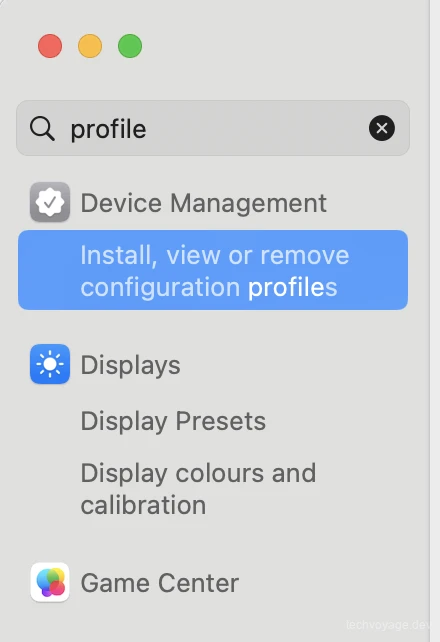
- 按一下**安裝、檢視或移除...**(Install, view or remove...)開始新增您的新設定檔。

- 按一下左下角的 **+**(加號)圖示,並選擇您儲存的 `.mobileconfig` 檔案。
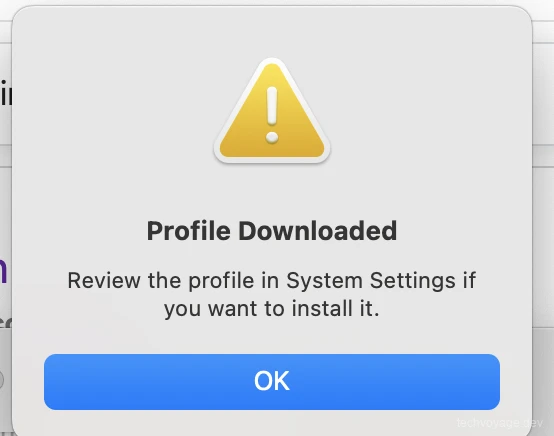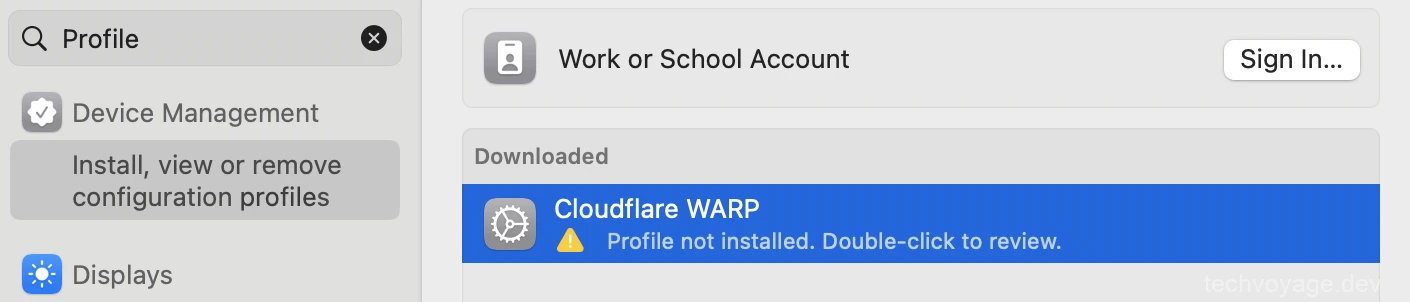
- 選擇 **Cloudflare WARP** 並按一下**安裝**以套用此設定。
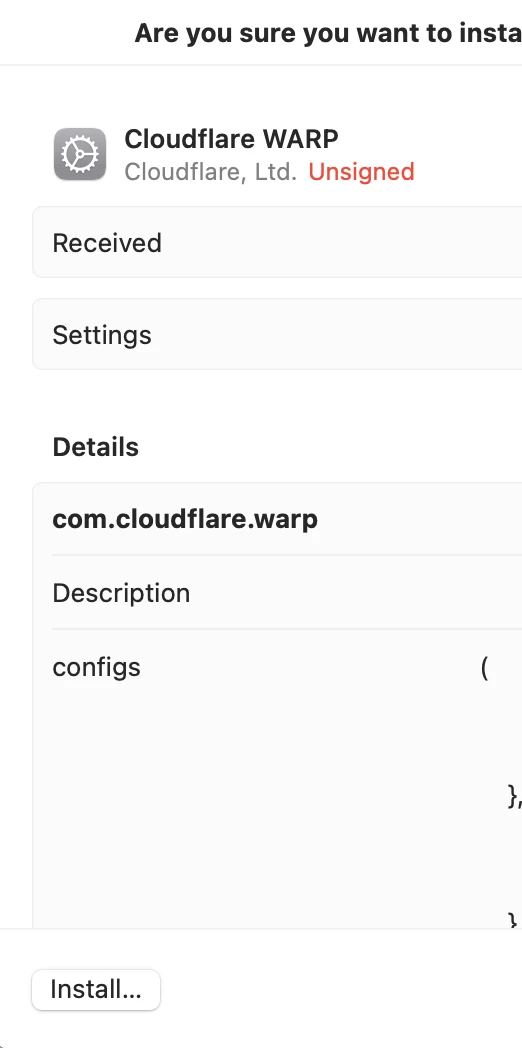
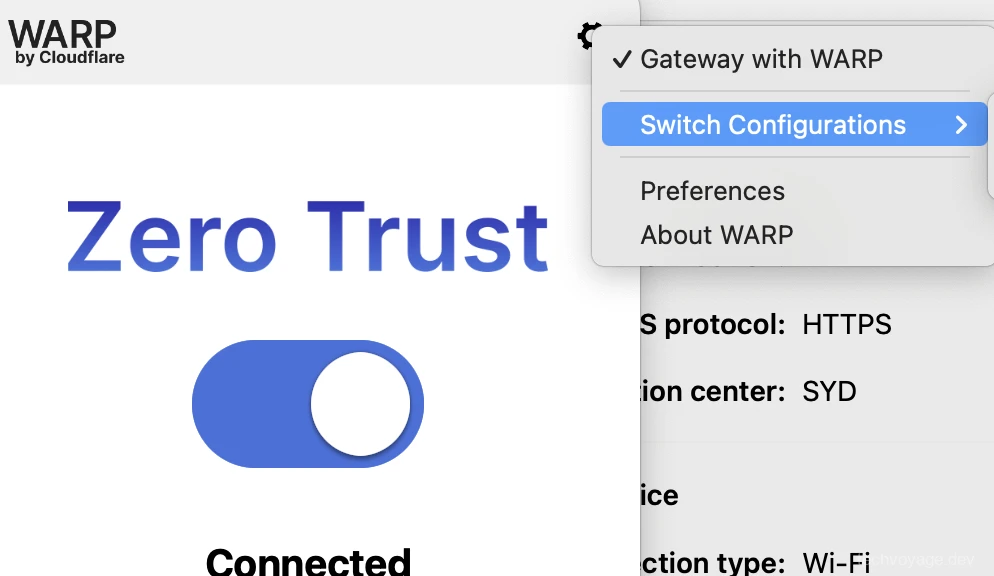
- 重新啟動您的 Cloudflare WARP 用戶端。您現在應該可以在使用者介面中看到多組織切換器:
## 結論
Cloudflare WARP 用戶端在用戶裝置上扮演著關鍵的安全邊界角色,使零信任網路存取(ZTNA)既穩固又極具實用性。透過將內部資源與公共網際網路隔離開來,可確保每一次連線嘗試都經過安全的身份驗證、評估與稽核。
## 參考資料
- [Managed Deployment Preparation](https://developers.cloudflare.com/cloudflare-one/team-and-resources/devices/cloudflare-one-client/deployment/mdm-deployment/#prepare-file-for-mdm-deployment)
- [Switch Between Zero Trust Organizations](https://developers.cloudflare.com/cloudflare-one/team-and-resources/devices/cloudflare-one-client/deployment/mdm-deployment/switch-organizations/)
- [Introducing WARP Connector: Paving the Path to Any-to-Any Connectivity](https://blog.cloudflare.com/introducing-warp-connector-paving-the-path-to-any-to-any-connectivity-2/)
- [Cloudflare One Client Documentation](https://developers.cloudflare.com/cloudflare-one/team-and-resources/devices/cloudflare-one-client/)