---
title: "Build a Persistent AI Memory System on Cloudflare"
canonical_url: "https://techvoyage.dev/article/use-cloudflare-as-ai-memory"
last_updated: "2026-10-20T09:53:39.815Z"
meta:
description: "Learn how to build a persistent, self-hosted AI memory system on Cloudflare using Second Brain and MCP. Share context across Claude, Gemini, and Obsidian."
"og:description": "Learn how to build a persistent, self-hosted AI memory system on Cloudflare using Second Brain and MCP. Share context across Claude, Gemini, and Obsidian."
"og:title": "Build a Persistent AI Memory System on Cloudflare"
"twitter:description": "Learn how to build a persistent, self-hosted AI memory system on Cloudflare using Second Brain and MCP. Share context across Claude, Gemini, and Obsidian."
"twitter:title": "Build a Persistent AI Memory System on Cloudflare"
---
[Home](https://techvoyage.dev/)
 # **Build a Persistent AI Memory System on Cloudflare**
Learn how to build a persistent, self-hosted AI memory system on Cloudflare using Second Brain and MCP. Share context across Claude, Gemini, and Obsidian.
Aug 7, 2026 -7 MIN READ
[**Cloudflare**](https://techvoyage.dev/category/cloudflare) [**AI & Agents**](https://techvoyage.dev/category/ai-agents)
Table of contents
## The Importance of Persistent AI Memory for Agents
As AI assistants become integrated into our daily lives, we frequently encounter the blank context issue. The decisions made last week are forgotten, requiring us to input the same tech stack details, and set the user preferences all over again.
Instead of starting from scratch every time, we need to build a memory system that evolves, continuously understands a user's decisions and eliminates the need to repeat context.
## Self-Hosted vs. Built-In AI Memory Systems
Many AI agents come with built-in memory, but we don't just use one agent for all purposes. We use Claude for architecting and designing a project; Kimi for coding; and ChatGPT for research. The context is not shared among these agents; it remains siloed per agent.
From a software engineering point of view, we don't trust black boxes. We need AI memory system that is observable, auditable, and under our control. The open sourced project, [**Second Brain**](https://github.com/Tech-Voyage-Dev/second-brain-cloudflare/tree/main), forked from [**https://github.com/rahilp/second-brain-cloudflare**](https://github.com/rahilp/second-brain-cloudflare), provides a persistent and self-hosted memory system with Model Context Protocol (MCP) support. Any compatible AI agents such as Claude, ChatGPT, Kimi Code can share the same context.
## How to Build a Second Brain AI Memory on Cloudflare
The Second Brain memory system is deployed on **Cloudflare Workers**, which provides globally distributed, low-latency execution server infrastructure. This allows the memory recall and other operations to execute with minimal latency to the AI’s reasoning loop.
The **Workers AI** embedding model is used for generating the embeddings. These embeddings are stored in **Cloudflare Vectorize**, which is a globally distributed vector database. The **Cloudflare Vectorize** performs the cosine similarity search for semantically related memories.
Duplication detection and smart merging mechanisms are implemented in Second Brain. Content with less than 85% similarity is stored, otherwise it is blocked or marked as a duplicate candidate. Text exceeding 1,600 characters is split at sentence or line-break boundaries with 200-character overlap to prevent loss of context. Then each chunk is embedded as a vector which allows precise matching.
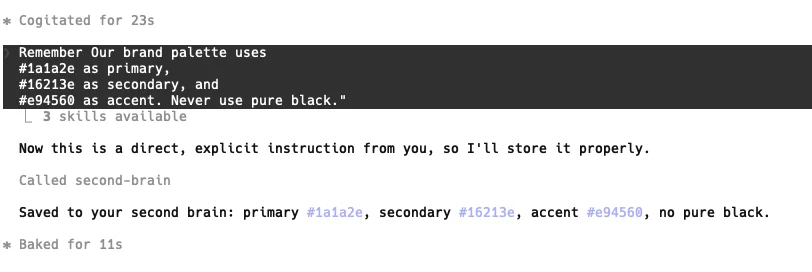
The following tools are exposed as MCP interfaces to be used in AI agents: - `**remember**`: Store ideas, decisions, preferences, and project context - `**append**`: Add an update to an existing memory - `**update**`: Replace an existing memory - `**recall**`: Find memories by meaning rather than exact wording - `**list_recent**`: Browse recently saved memories - `**forget**`: Permanently delete a memory - `link/connections``: Connect related memories (v2 graph feature) ### Setup Second Brain on Cloudflare 1. Click on `**Deploy to Cloudflare**` at the [**Github repo**](https://github.com/Tech-Voyage-Dev/second-brain-cloudflare) page. [[]] 2. Fill out the Cloudflare Worker form. 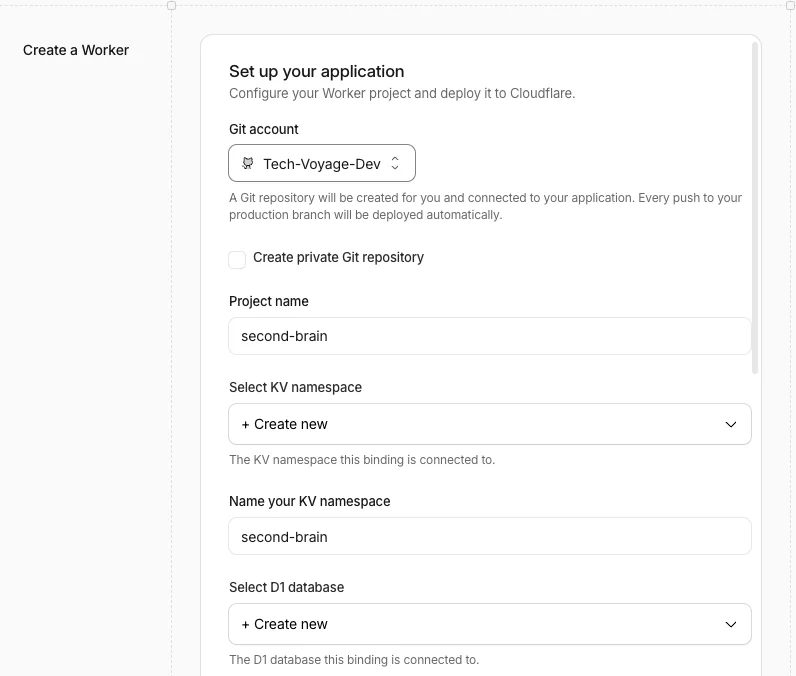 3. Enter '384' for Dimensions; select 'cosine' for Metric; and click the Deploy button. 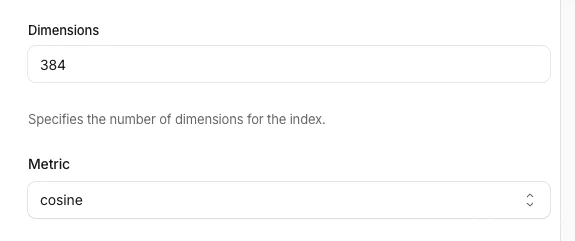 4. The following is the overview of the Second Brain in Cloudflare Worker 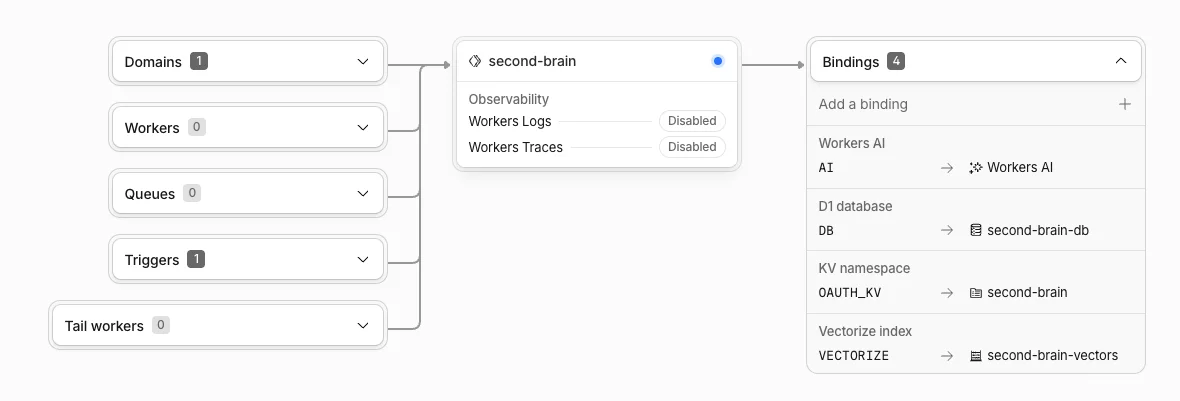 5. Click on 'Settings', then click edit icon for 'AUTH_TOKEN' for creating a token 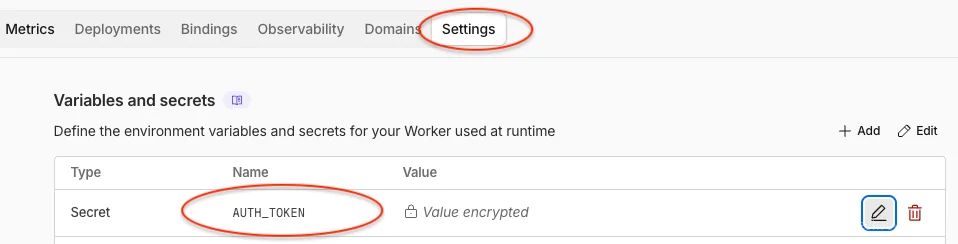 6. Click the 'Rotate' link for entering a new value 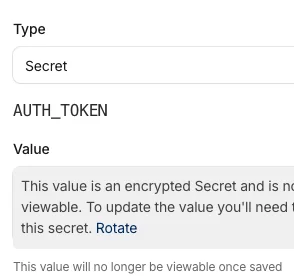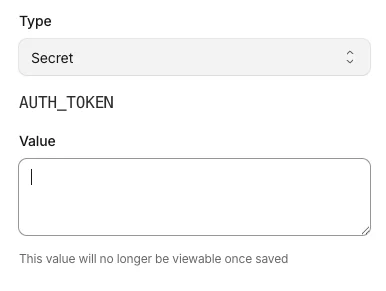 7. Run the command `**openssl rand -base64 32**` at macOS terminal to create a random value and paste it in the 'Value' input field. 8. Click the 'Deploy' button to update the new value of 'AUTH_TOKEN'. 9. Open the Second Brain worker url on the web browser 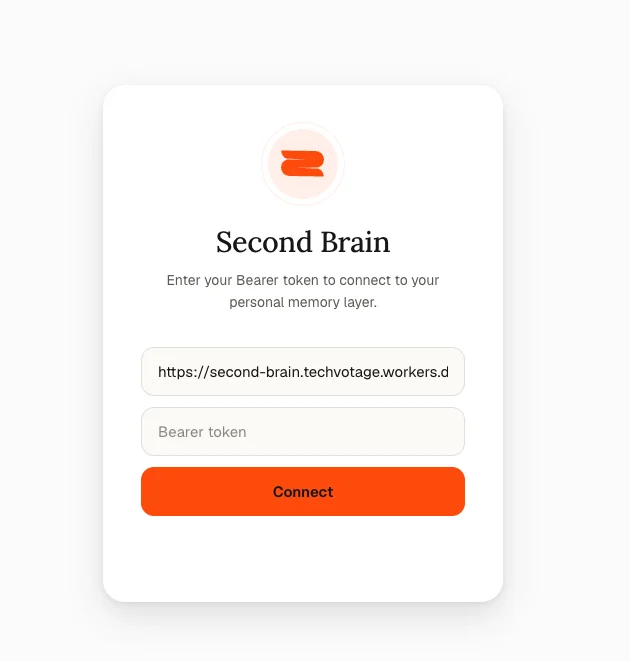 10. Enter the created 'AUTH_TOKEN' in the `**Bearer token**` input field and click 'Connect' button to login to the Web UI. ### Integrating Claude Desktop via MCP 1. Click on 'Customize' at Claude Desktop. 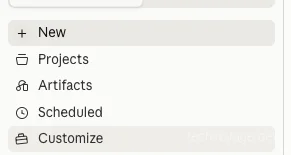 2. Click on 'Developer' to manually edit the MCP Servers config file 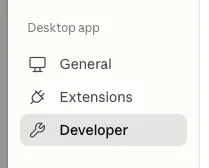 3. Add the following code to the `**mcpServers**` section in `**claude_desktop_config.json**`
```
"second-brain": {
"command": "npx",
"args": [
"mcp-remote",
"https:///mcp",
"--header",
"Authorization: Bearer "
]
}
```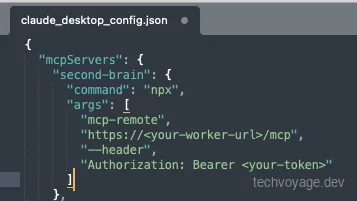4. Restart Claude Desktop and check the 'Local MCP servers'. The status says 'running'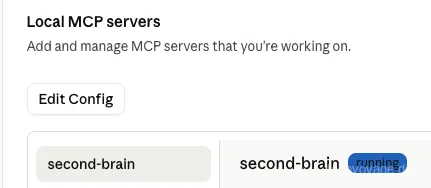 ### Integrating Claude Code via MCP - Run the following command to add the MCP```
claude mcp add --transport http second-brain https:///mcp
```- Claude Code detects that the endpoint requires OAuth and will open the login page at the web browser for entering `**AUTH_TOKEN**`- Create the `**CLAUDE.md**` file in `**~/.claude**` folder with the instructions from [**CLAUDE_INSTRUCTIONS.md**](https://github.com/rahilp/second-brain-cloudflare/blob/main/AI_Instructions/CLAUDE_INSTRUCTIONS.md). ### Integrating Gemini CLI via MCP 1. Add the following MCP server settings to './.gemini/settings.json'```
"second-brain": {
"httpUrl": "https:///mcp",
"oauth": {
"enabled": true
}
}
```1. Start the Gemini CLI ### Test Second Brain in AI Agents 1. Started with a simple brand palette settings in '**Claude Desktop**', the Second Brain is not called. 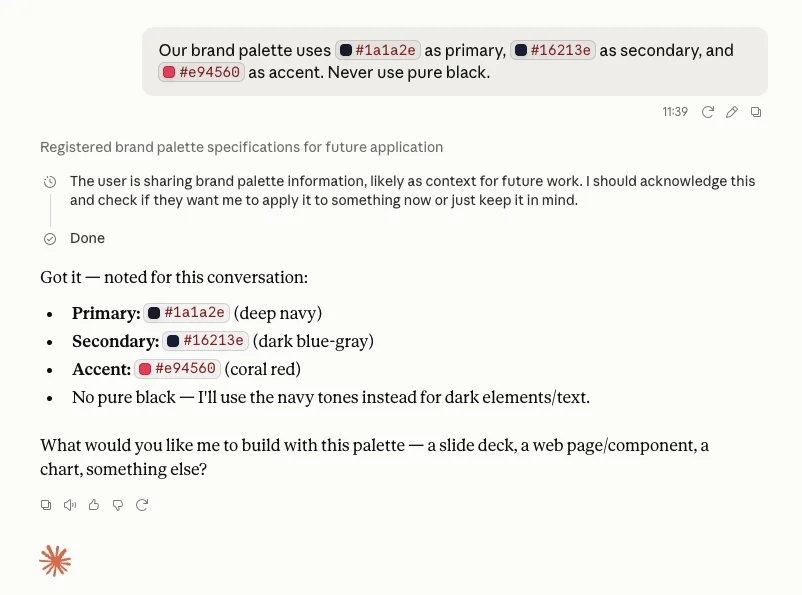 2. Tried with the keyword, 'remember', only `**memory_user-edits**` tools in '**Claude Desktop**' are used but not Second Brain. 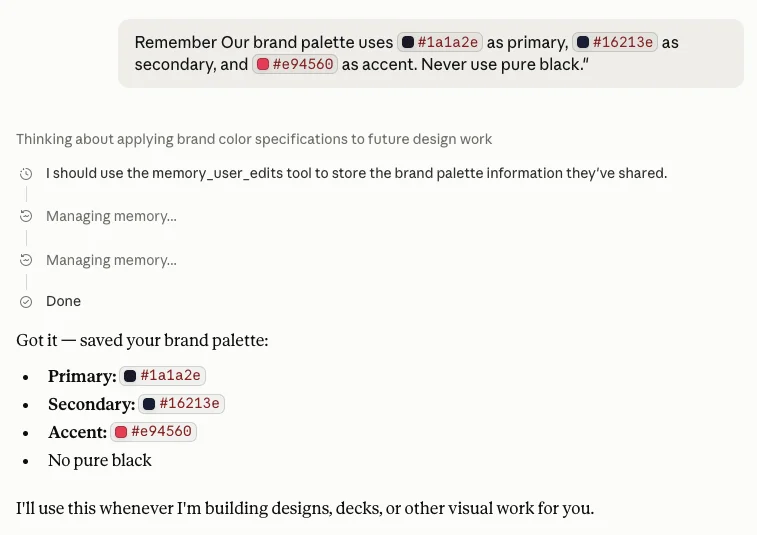 3. Tried the the following prompt in '**Claude Code**', Second Brain was called.```
Remember Our brand palette uses \`#1a1a2e\` as primary, \`#16213e\` as secondary, and \`#e94560\` as accent. Never use pure black."
```4. Verified the colour settings in the **Second Brain at Cloudflare**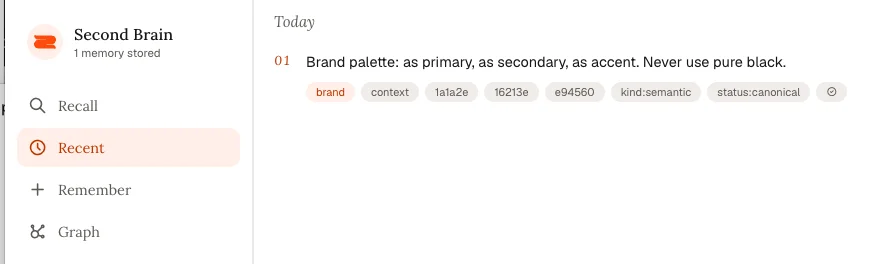 - _The reason Claude Code worked was because the CLAUDE_INSTRUCTIONS.md contains the 'Second Brain' keywords._ 5. Included 'Second Brain' as keywords in '**Claude Desktop**', need to be explicitly specified to store to and retrieve from the Second Brain memory layer. 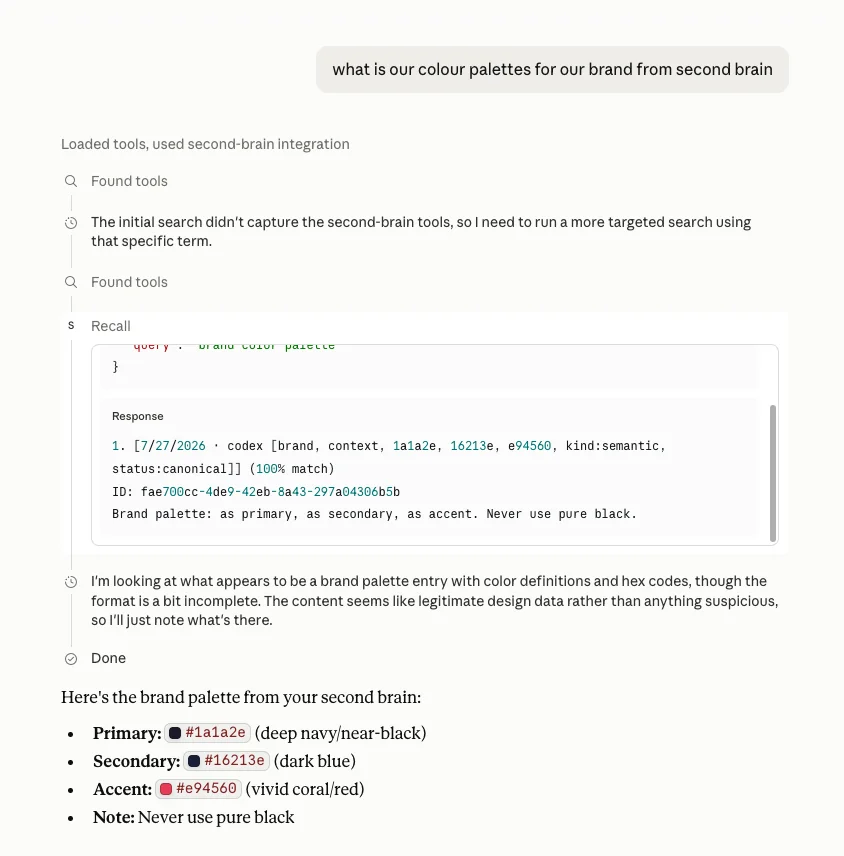 6. The keywords, 'Second Brain', need to be mentioned in the **Gemini CLI** to trigger the Second Brain MCP. 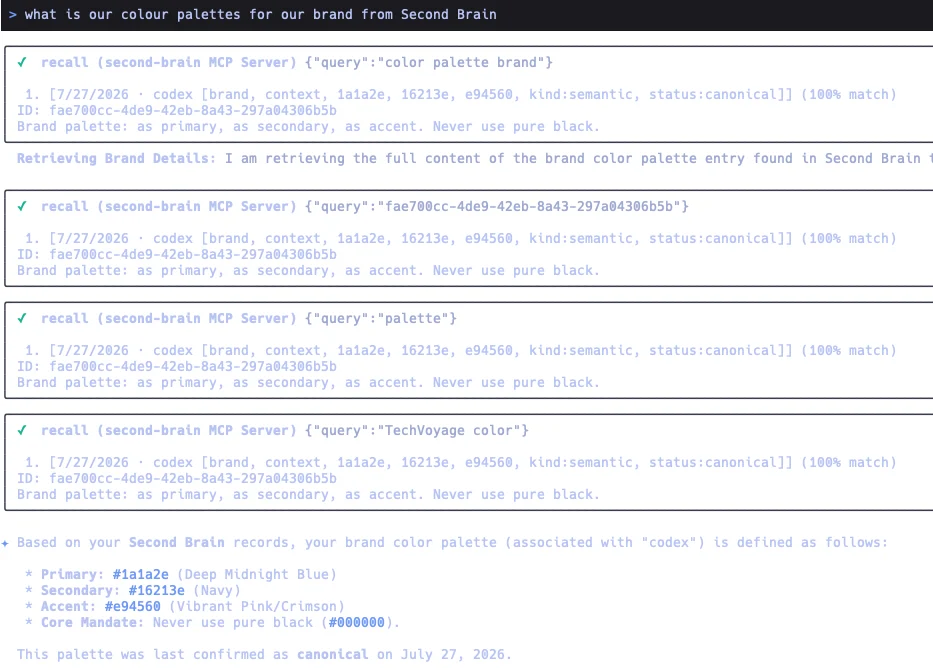 - _Adding similar instructions to GEMINI.md like what has been done in CLAUDE_INSTRUCTIONS.md will trigger the Second Brain without mentioning the keywords._### Web Browser Extensions - Extensions are available for Chrome, Firefox and Microsoft Edge web browsers. - The extensions are for - **Capture the current page** — saves the title and URL to the Second Brain - **Capture highlighted text** — select any text on a page before clicking capture; the excerpt is saved alongside the title and URL - **Add a note** — type context or `**#hashtags**` in the popup before saving; hashtags are automatically extracted as tags ### Syncing Personal Knowledge with the Obsidian Plugin - Obsidian plugin is available to sync the notes from the Obsidian Vault to Second Brain at Cloudflare. - Notes can be tagged for syncing to the Second Brain #### Install Obsidian Plugin 1. Open Obsidian → Settings → Community Plugins 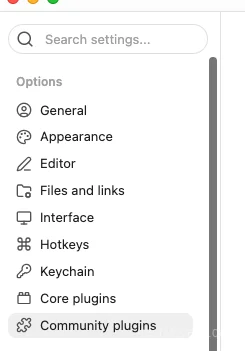 2. Click on 'Browse' button  3. Search for 'Second Brain Sync' 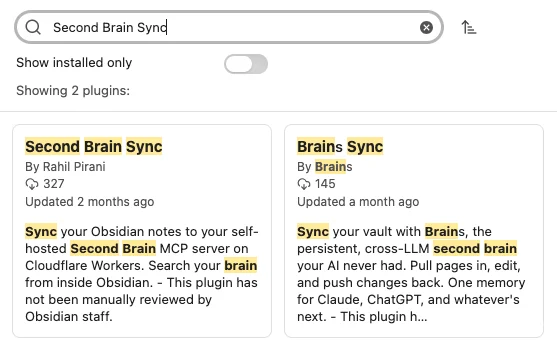 4. Click 'Install' button then 'Enable' button 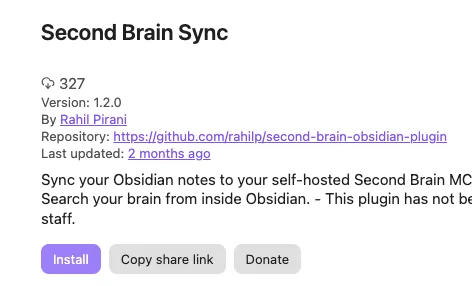 #### Configure Obsidian Plugin 1. Open Obsidian → Settings → Second Brain Sync 2. Enter the 'URL' and 'Auth token' 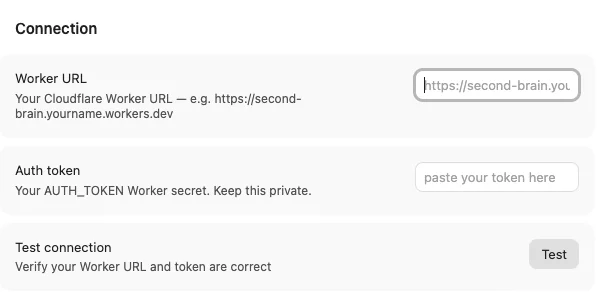 3. Click 'Test' button to verify it is connected. 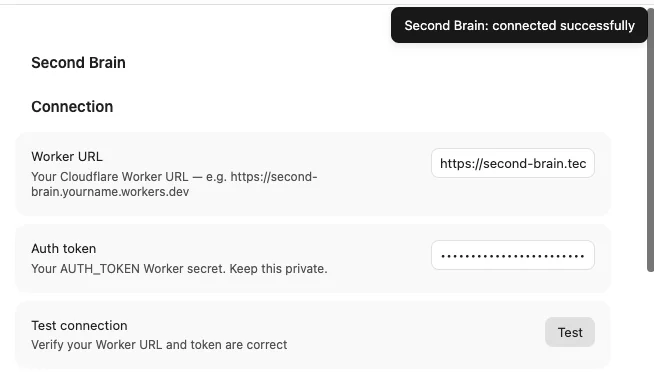 4. Configure the sync behaviours. Set the 'Sync tag' and enable 'Auto-sync on save'. 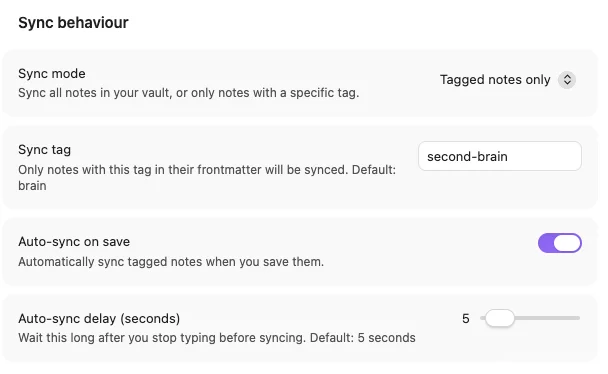 5. Create a note in Obsidian with the tag, 'second-brain', as it was configured as the 'Sync tag'. 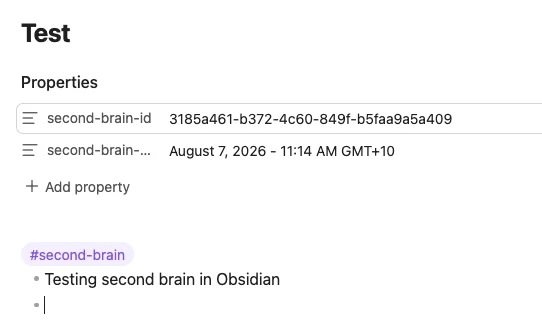 6. The note has been saved and synced to the Second Brain deployed at Cloudflare. 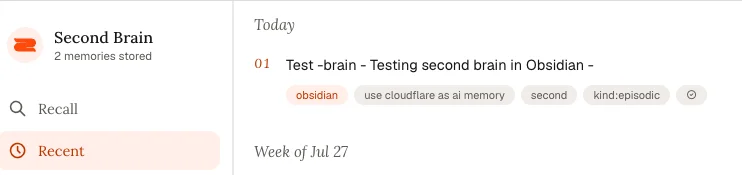 ## Conclusion Second Brain provides an open-source solution to one of the most frustrating issues in AI: persistent memory. By combining it with Cloudflare infrastructure, it delivers a fully self-hosted memory layer that is globally distributed with low latency. The MCP tools built into Second Brain make this memory portable across all AI agents. The Obsidian plugin extends the Second Brain into personal knowledge management. Notes in an Obsidian vault can be selectively synchronised to Second Brain, transforming raw notes into structured context that AI agents can semantically understand and retrieve. By combining self-hosting, semantic search, and standards-based MCP integration; Second Brain proves to be more than just a memory layer but a practical foundation for building an AI ecosystem. ## Reference: - [**https://www.thesecondbrain.dev/**](https://www.thesecondbrain.dev/) - [**https://github.com/rahilp/second-brain-cloudflare/wiki/How-It-Works**](https://github.com/rahilp/second-brain-cloudflare/wiki/How-It-Works) - [**Connect to AI Clients**](https://github.com/rahilp/second-brain-cloudflare/wiki/Connect-to-AI-Clients) - [**Second Brain Obsidian Plugin**](https://github.com/rahilp/second-brain-cloudflare/wiki/Obsidian-Plugin) - [**https://github.com/rahilp/second-brain-obsidian-plugin**](https://github.com/rahilp/second-brain-obsidian-plugin) [Share](https://api.whatsapp.com/send?text=https%3A%2F%2Ftechvoyage.dev%2Farticle%2Fuse-cloudflare-as-ai-memory) [Share](https://www.reddit.com/submit?url=https%3A%2F%2Ftechvoyage.dev%2Farticle%2Fuse-cloudflare-as-ai-memory) [Share](https://www.facebook.com/sharer/sharer.php?u=https%3A%2F%2Ftechvoyage.dev%2Farticle%2Fuse-cloudflare-as-ai-memory) [Share](https://www.linkedin.com/sharing/share-offsite/?url=https%3A%2F%2Ftechvoyage.dev%2Farticle%2Fuse-cloudflare-as-ai-memory) [Share](https://x.com/intent/post?url=https%3A%2F%2Ftechvoyage.dev%2Farticle%2Fuse-cloudflare-as-ai-memory) ## **Related Articles**[**Travel****Self-Host Your Travel Itineraries with TREK and Docker**
Learn how to deploy TREK using Docker, secure it via Cloudflare R2 and Caddy, and leverage AI agents with MCP for seamless travel planning.**22 MIN READ **](https://techvoyage.dev/article/self-hosted-travel-planner-trek) [**Collaboration****Self-Host Block's Buzz: Shared AI Agent Workspace**
Learn how to self-host Block's Buzz on a Linux VPS behind Cloudflare DNS. Run a secure, Nostr-powered workspace where humans and AI agents collaborate.**16 MIN READ **](https://techvoyage.dev/article/self-hosting-buzz-as-the-workspace-where-ai-agents-become-colleagues) [**AI & Agents****How AI Agent Skills Replace Nuxt App Scaffolding Scripts**
Scaffold Nuxt on Cloudflare Workers easily. Learn why we replaced brittle shell scripts with AI agent skills and how to install them with npx skills.**4 MIN READ **](https://techvoyage.dev/article/how-ai-agent-skills-replace-nuxt-app-scaffolding-scripts) [](https://techvoyage.dev/article/switch-between-multiple-cloudflare-warp-orgs-on-mac) [](https://techvoyage.dev/article/how-ai-agent-skills-replace-nuxt-app-scaffolding-scripts)