---
title: "Switch Between Multiple Cloudflare WARP Orgs on Mac"
canonical_url: "https://techvoyage.dev/article/switch-between-multiple-cloudflare-warp-orgs-on-mac"
last_updated: "2026-10-20T09:53:41.551Z"
meta:
description: "Configure and switch multiple Cloudflare WARP organisations on macOS using a .mobileconfig file. A complete MDM guide for IT admins."
"og:description": "Configure and switch multiple Cloudflare WARP organisations on macOS using a .mobileconfig file. A complete MDM guide for IT admins."
"og:title": "Switch Between Multiple Cloudflare WARP Orgs on Mac"
"twitter:description": "Configure and switch multiple Cloudflare WARP organisations on macOS using a .mobileconfig file. A complete MDM guide for IT admins."
"twitter:title": "Switch Between Multiple Cloudflare WARP Orgs on Mac"
---
[Home](https://techvoyage.dev/)
 # **Switch Between Multiple Cloudflare WARP Orgs on Mac**
Configure and switch multiple Cloudflare WARP organisations on macOS using a .mobileconfig file. A complete MDM guide for IT admins.
Jul 4, 2026 -4 MIN READ
[**Security**](https://techvoyage.dev/category/security) [**Cloudflare**](https://techvoyage.dev/category/cloudflare)
Table of contents
## What Is Cloudflare WARP?
Cloudflare WARP is a client-side application that routes specified device traffic through Cloudflare's global network instead of directly out to the public internet.
It creates an encrypted tunnel built on the **WireGuard** protocol, securing traffic from the device to the nearest Cloudflare data center. Policies can then be created in your Cloudflare dashboard to filter, log, inspect, or route this incoming traffic.
## Why Do We Need Cloudflare WARP?
To securely expose internal resources—such as private web services or SaaS applications—to employees, contractors, and other stakeholders, the Cloudflare WARP client is the as the client-side enforcement point for **Zero Trust Network Access (ZTNA)**.
The Cloudflare WARP client is installed on a user’s laptop or phone. It requires users to authenticate and meet specific security posture checks (such as coming from an approved IP range, using a registered email domain, or running an active firewall) before granting access.
By tunneling device traffic directly to Cloudflare, the user's identity, device, and policies are verified before requests ever reach internal resources. As a result, internal resources are never exposed to the public internet, and every single request is fully logged and audited.
## Supporting Multiple WARP Profiles on One Device
When users need to switch between personal and corporate Cloudflare accounts, or when system administrators manage multiple tenants, supporting multiple WARP profiles on a single device becomes crucial.
To achieve this on macOS, we can use a `**.mobileconfig**` MDM profile file to define and register the different WARP environments. - [**Download a sample **`**.mobileconfig**`** file**](https://developers.cloudflare.com/cloudflare-one/static/mdm/multiple-orgs/CloudflareWARP.mobileconfig) directly from Cloudflare. - Below is an example of what this configuration looks like:
```
PayloadContent
PayloadDisplayName
Warp Configuration
PayloadIdentifier
com.cloudflare.warp.CB8B22D4-50E1-48E8-8874-A7594627013A
PayloadOrganization
Cloudflare Ltd.
PayloadType
com.cloudflare.warp
PayloadUUID
CB8B22D4-50E1-48E8-8874-A7594627013A
PayloadVersion
1
configs
organization
your-team-name-1
display_name
Team 1
organization
your-team-name-2
display_name
Team 2
PayloadDisplayName
Cloudflare WARP
PayloadIdentifier
cloudflare_warp
PayloadOrganization
Cloudflare, Ltd.
PayloadRemovalDisallowed
PayloadScope
System
PayloadType
Configuration
PayloadUUID
2B7763B8-64F6-41EB-AA5E-7761651B8131
PayloadVersion
1
```- Replace `**your-team-name-1**` and `**your-team-name-2**` with your respective Cloudflare Zero Trust team names. - Run the command `**uuidgen**` in your Terminal to generate unique UUIDs, and use them to replace the placeholder `**PayloadUUID**` values in the `**.mobileconfig**` file. - Make sure that the `**PayloadIdentifier**` string also contains the updated `**PayloadUUID**` to keep the profile distinct. - Save your edited `**.mobileconfig**` file. - Open **System Settings** on your Mac, search for **Profiles**, and select it.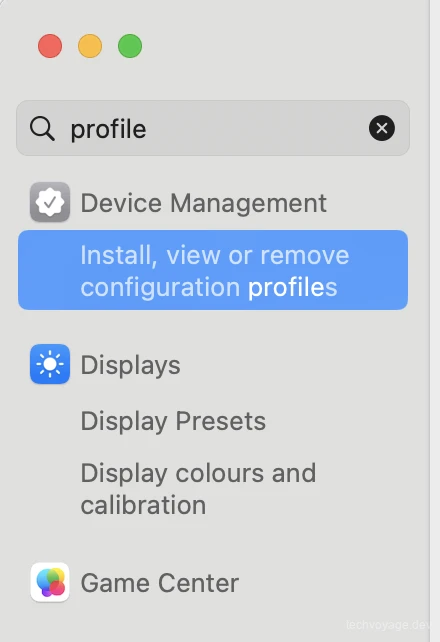 - Click on **Install, view or remove...** to begin adding your new configuration profile. - Click the **+** (plus) icon in the bottom-left corner and select your saved `**.mobileconfig**` file.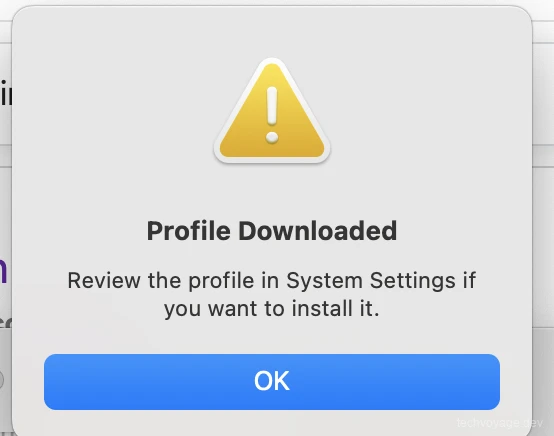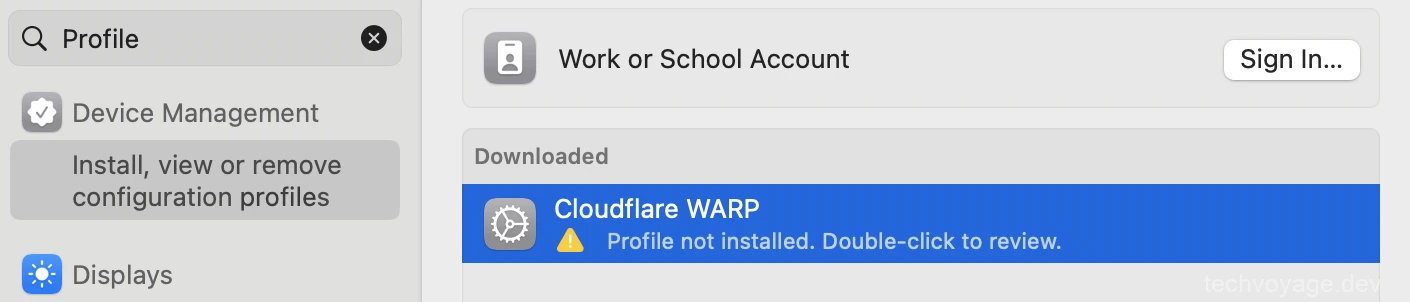 - Select **Cloudflare WARP** and click **Install** to apply the configuration.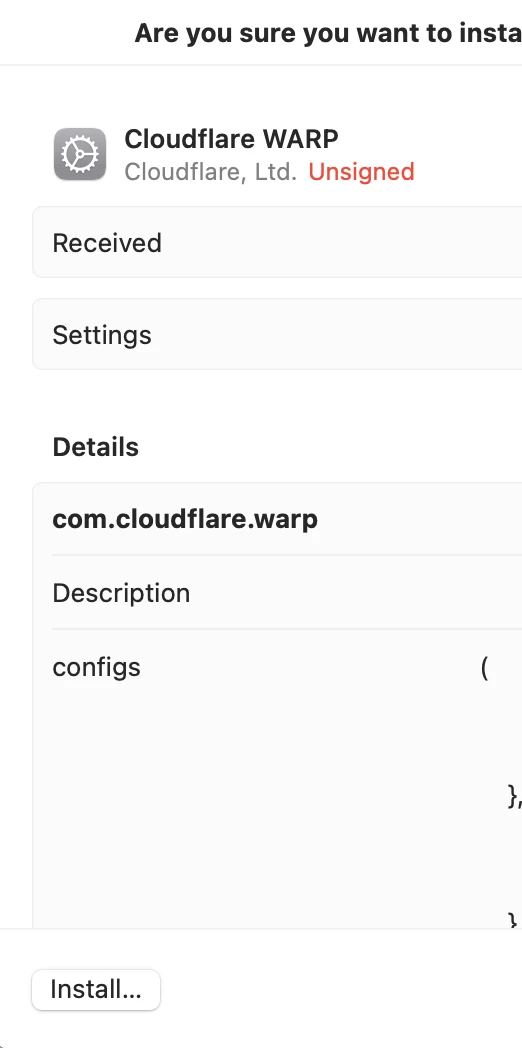 - Restart your Cloudflare WARP client. You should now see the multi-profile switcher in the user interface: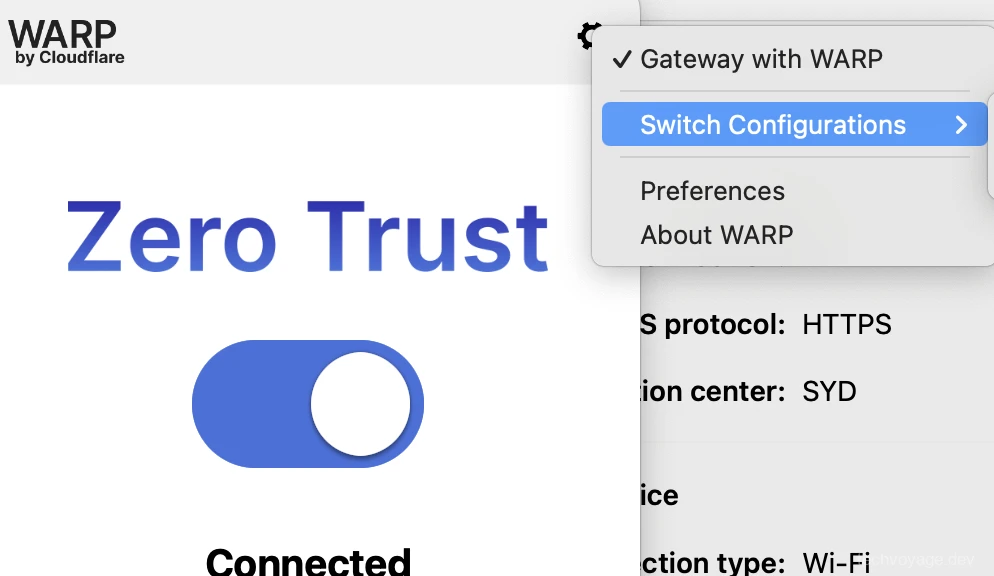 ## Conclusion The Cloudflare WARP client acts as a critical security point on user devices, making Zero Trust Network Access both robust and highly practical. Keeping internal resources isolated from the public internet ensures that every connection attempt is securely authenticated, evaluated, and audited. ## References - [**Managed Deployment Preparation**](https://developers.cloudflare.com/cloudflare-one/team-and-resources/devices/cloudflare-one-client/deployment/mdm-deployment/#prepare-file-for-mdm-deployment) - [**Switch Between Zero Trust Organizations**](https://developers.cloudflare.com/cloudflare-one/team-and-resources/devices/cloudflare-one-client/deployment/mdm-deployment/switch-organizations/) - [**Introducing WARP Connector: Paving the Path to Any-to-Any Connectivity**](https://blog.cloudflare.com/introducing-warp-connector-paving-the-path-to-any-to-any-connectivity-2/) - [**Cloudflare One Client Documentation**](https://developers.cloudflare.com/cloudflare-one/team-and-resources/devices/cloudflare-one-client/) [Share](https://api.whatsapp.com/send?text=https%3A%2F%2Ftechvoyage.dev%2Farticle%2Fswitch-between-multiple-cloudflare-warp-orgs-on-mac) [Share](https://www.reddit.com/submit?url=https%3A%2F%2Ftechvoyage.dev%2Farticle%2Fswitch-between-multiple-cloudflare-warp-orgs-on-mac) [Share](https://www.facebook.com/sharer/sharer.php?u=https%3A%2F%2Ftechvoyage.dev%2Farticle%2Fswitch-between-multiple-cloudflare-warp-orgs-on-mac) [Share](https://www.linkedin.com/sharing/share-offsite/?url=https%3A%2F%2Ftechvoyage.dev%2Farticle%2Fswitch-between-multiple-cloudflare-warp-orgs-on-mac) [Share](https://x.com/intent/post?url=https%3A%2F%2Ftechvoyage.dev%2Farticle%2Fswitch-between-multiple-cloudflare-warp-orgs-on-mac) ## **Related Articles**[**Security****Stop Exposing Your Vault: Secure NodeWarden with Cloudflare**
The moment your NodeWarden is exposed to the public on the Internet, it starts attracting thousands of automated bots scrapping for vulnerabilities 24/7.**8 MIN READ **](https://techvoyage.dev/article/how-to-secure-nodewarden-at-cloudflare) [**Security****How to Self-Host a BitWarden Compatible Server Nodewarden**
Your passwords are your most critical digital property, and keeping them secure means keeping them in your own hands.**8 MIN READ **](https://techvoyage.dev/article/self-hosting-nodewarden-at-cloudflare) [**AI & Agents****How to Expose Hermes Agent Privately with Cloudflare WARP**
Learn how to securely expose and access your Hermes Agent globally using Cloudflare WARP and Zero Trust without opening inbound firewall ports.**8 MIN READ **](https://techvoyage.dev/article/exposing-hermes-agent-to-private-network-using-cloudflare-warp) [](https://techvoyage.dev/article/ai-agent-skills-what-they-are-how-to-create-them) [](https://techvoyage.dev/article/use-cloudflare-as-ai-memory)