---
title: "Bringing Buzz to DeepSeek Harness: Taught to Speak Nostr"
canonical_url: "https://techvoyage.dev/article/bringing-buzz-to-deepseek-harness"
last_updated: "2026-10-20T09:53:39.317Z"
meta:
description: "Integrate DeepSeek Harness with Block Buzz using a Nostr bridge. Configure NIP-42 auth, in-place message streaming, and per-channel agent workspaces."
"og:description": "Integrate DeepSeek Harness with Block Buzz using a Nostr bridge. Configure NIP-42 auth, in-place message streaming, and per-channel agent workspaces."
"og:title": "Bringing Buzz to DeepSeek Harness: Taught to Speak Nostr"
"twitter:description": "Integrate DeepSeek Harness with Block Buzz using a Nostr bridge. Configure NIP-42 auth, in-place message streaming, and per-channel agent workspaces."
"twitter:title": "Bringing Buzz to DeepSeek Harness: Taught to Speak Nostr"
---
[Home](https://techvoyage.dev/)
 # **Bringing Buzz to DeepSeek Harness: Taught to Speak Nostr**
Integrate DeepSeek Harness with Block Buzz using a Nostr bridge. Configure NIP-42 auth, in-place message streaming, and per-channel agent workspaces.
Sep 30, 2026 -9 MIN READ
[**AI & Agents**](https://techvoyage.dev/category/ai-agents) [**Collaboration**](https://techvoyage.dev/category/collaboration) [**Buzz**](https://techvoyage.dev/category/buzz) [**DeepSeek Harness**](https://techvoyage.dev/category/deepseek-harness)
Table of contents
The DeepSeek Harness (DSH) plugin, **[**dsh-message-gateway**](https://github.com/a792883583/dsh-message-gateway)**, extends the DeepSeek Harness assistant across messaging platforms such as Discord, Telegram, and WeChat. The plugin repository was forked and extended to add the **[**Buzz**](https://techvoyage.dev/article/self-hosting-buzz-as-the-workspace-where-ai-agents-become-colleagues)** platform to the list. The forked repository is available on GitHub at [**https://github.com/Tech-Voyage-Dev/dsh-message-gateway**](https://github.com/Tech-Voyage-Dev/dsh-message-gateway).
[**Prerequisite guide****Self-Host Block's Buzz: Shared AI Agent Workspace**
Learn how to self-host Block's Buzz on a Linux VPS behind Cloudflare DNS. Run a secure, Nostr-powered workspace where humans and AI agents collaborate.**12 MIN READ **](https://techvoyage.dev/article/self-hosting-buzz-as-the-workspace-where-ai-agents-become-colleagues)
The DSH assistant joins a Buzz relay as a member, receives direct messages (DMs) and channel messages where it is @mentioned, and responds through the same per-chat agent pipeline used by the Web UI.
## Architecture of the dsh-message-gateway Plugin
The architecture of the **dsh-message-gateway** plugin splits into two parts: - **Host** (Node): `**gateway-store**` (credentials, `**~/.dsh/gateway.json**`), `**platforms.ts**` (platform definitions + connection tests), `**routes.ts**` ( `**/gateway/***` endpoints), and `**bridge-manager.ts**` (the resident bridges: per-chat independent agent sessions + streamed replies). - **Client** (browser): the sidebar "**Message platforms**" page where you save credentials, test connections, and monitor status.
Adding a new platform involves the following steps: 1. **A bridge class** — `**start/stop/status**` plus an `**onText(text, frame)**` callback, mirroring `**wecom-bridge.ts**`. 2. **Bridge-manager wiring** — reuse the existing per-chat pipeline ( `**ensureAgentForKey**` + `**pendingMap**`) and swap in the platform's reply sink. 3. **Storage/route wiring** — in `**/gateway/save**` and `**/gateway/delete**`: **saving credentials starts the bridge, deleting stops it** — plus an `**autoStartXxx**` flag so `**dsh web**` reconnects on boot. ## Building the Buzz Bridge: Nostr Protocol & Event Lifecycle
The **DeepSeek Harness** was used to implement the Buzz bridge. The implementation conforms to the following Nostr protocol specifications:
| **Transport** | **One NIP-42-authenticated WebSocket; default **`**ws://localhost:3000**`**; **`**http(s)://**`** is normalised to **`**ws(s)://**` |
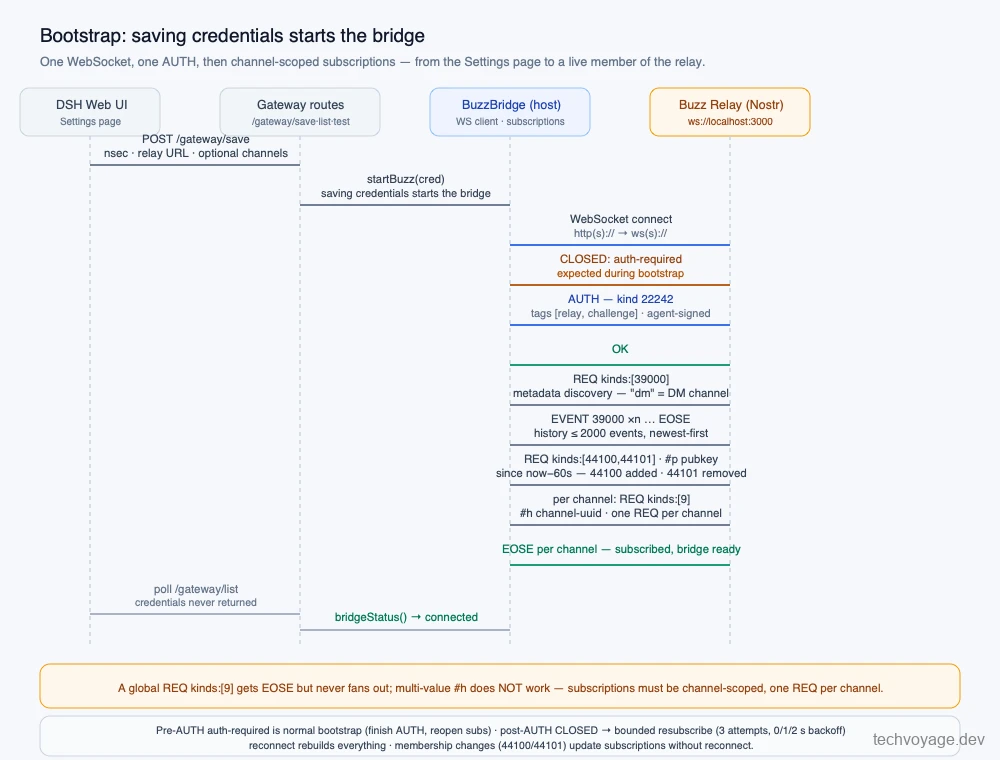
| --- | --- | | **Auth** | AUTH event `**kind 22242**`, tags `**[["relay", url], ["challenge", challenge]]**`, empty content, signed with the agent key | | **Subscriptions** | **Channel-scoped**: `**REQ {"kinds":[9], "#h":[]}**` — one REQ per channel. A global `**kinds:[9]**` REQ gets EOSE but never fans out; multi-value `**#h**` does **not** work | | **Discovery** | Historical `**REQ {kinds:[39000]}**` for channel metadata (`**type == "dm"**` marks a DM channel) | | **Membership** | Live `**REQ {kinds:[44100,44101], "#p":[our pubkey], since: now-60s}**` — 44100 = added, 44101 = removed, each carrying `**p**`+`**h**`; membership changes update subscriptions **without reconnect** | | **Chat events** | `**kind 9**` with tags `**["h", channel]**`, optional `**["e", replyTo]**`, `**["p", mention]**` | | **In-place edits** | `**kind 40003**` with `**h**` + `**e**`→target; content replaces; 64 KB relay cap → keep payloads ≤ 60,000 B; oversized replies chunk — chunk 0 rides the edit, overflow chunks are appended as threaded kind-9 messages (`**e**`→thread root) | | **CLOSED frames** | Pre-AUTH `**auth-required**` is normal bootstrap (finish AUTH, reopen subs); post-AUTH → bounded resubscribe (3 attempts, 0/1/2 s backoff); reconnect rebuilds everything | | **Relay caps** | ≤ 2000 historical events per subscription, newest-first even with `**since**` | | **Mention gating** | Act on inbound kind-9 only when (a) `**p**`-tag includes our pubkey, (b) channel is a DM, or (c) the `**e**` root is our own event (thread follow). Ignore our own pubkey — loop prevention | | **Outbound mentions** | Outbound text is published verbatim — the relay does not pre-check `**@**` tokens; `**p**` tags carry the inbound author + up to 7 other mentioned pubkeys (max 8) | | **DMs** | Relay-scoped plaintext channels (`**type: "dm"**` metadata) — no NIP-04/44 encryption in this bridge | | **Attachments (inbound)** | NIP-92 `**imeta**` (`**url**`, `**sha256**`, `**m**`) → plain http(s) download, verify SHA-256, 20 MB cap, max 4 per message; outbound images have no documented publish path → explicitly unsupported |
The diagram below illustrates how the Buzz bridge bootstraps:
 ### Real-Time Streaming via Nostr In-Place Edits (Kind 40003)
Nostr has no native typing indicator, and events are append-only. To make replies feel responsive and alive, the Buzz bridge **simulates streaming using in-place edits** as shown below:
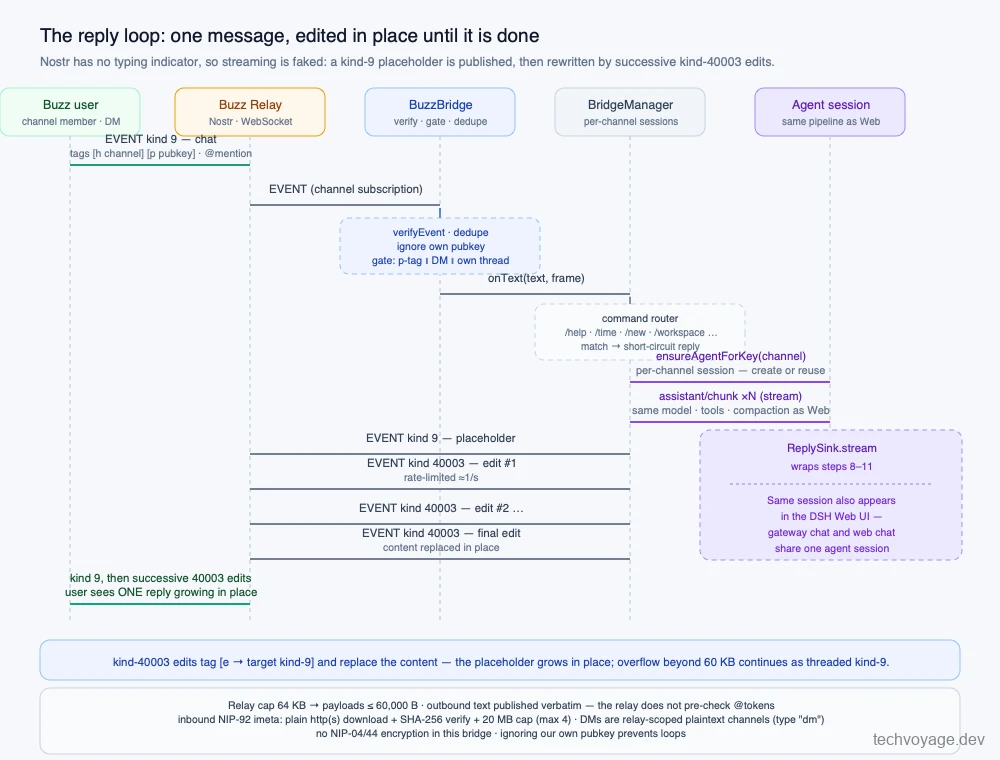 - _The Buzz bridge publishes a placeholder `**kind 9**` event, then progressively rewrites it with rate-limited `**kind 40003**` in-place edits, before writing the final edit when the agent completes its run. This mirrors the "send then edit" pattern used by Telegram and Discord bridges._### Bridging DeepSeek Harness Workspaces via Chat Commands
The DSH "Workspaces" feature in the Web UI is backed by the `**workspaceRegistry**` service (`**@deepseek-ai/dsh-workspace**`):
```
const existing = await ctx.workspaceRegistry.resolveByPath(request.path);
``` The Buzz bridge exposes a chat command, `**/workspace **`, which registers an existing folder in DSH. Any new session through the gateway attaches to it and appears in the Web UI.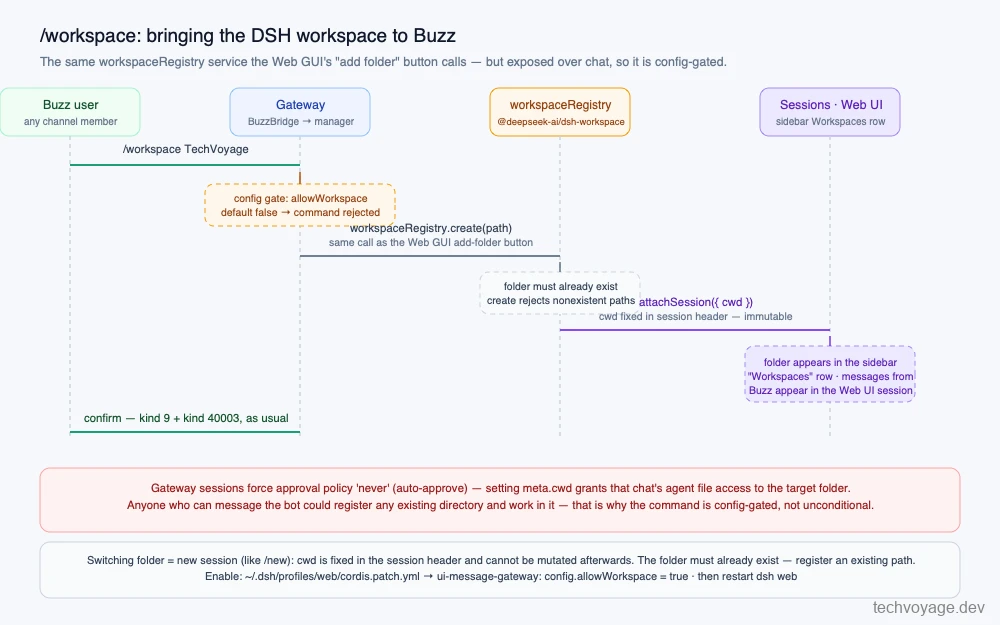 Three design considerations to note: - **Switching folder = new session.** `**cwd**` is written into the session header at creation and cannot be mutated afterwards. - **Folder must already exist.** `**create**` rejects non-existent paths. - **Security-sensitive command.** Every session operates under an **auto-approve** policy, granting file access to the target folder. ## Step-by-Step Installation & Configuration Guide 1. Run the following commands:```
dsh plugin --profile web add https://github.com/Tech-Voyage-Dev/dsh-message-gateway.git
# Start DSH web
dsh web
```1. Once the DSH Web UI is opened in a web browser, click on the 'Message platforms' icon: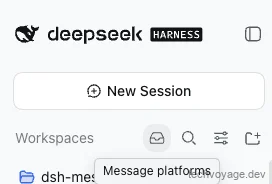 1. Click on 'Buzz' on the left panel: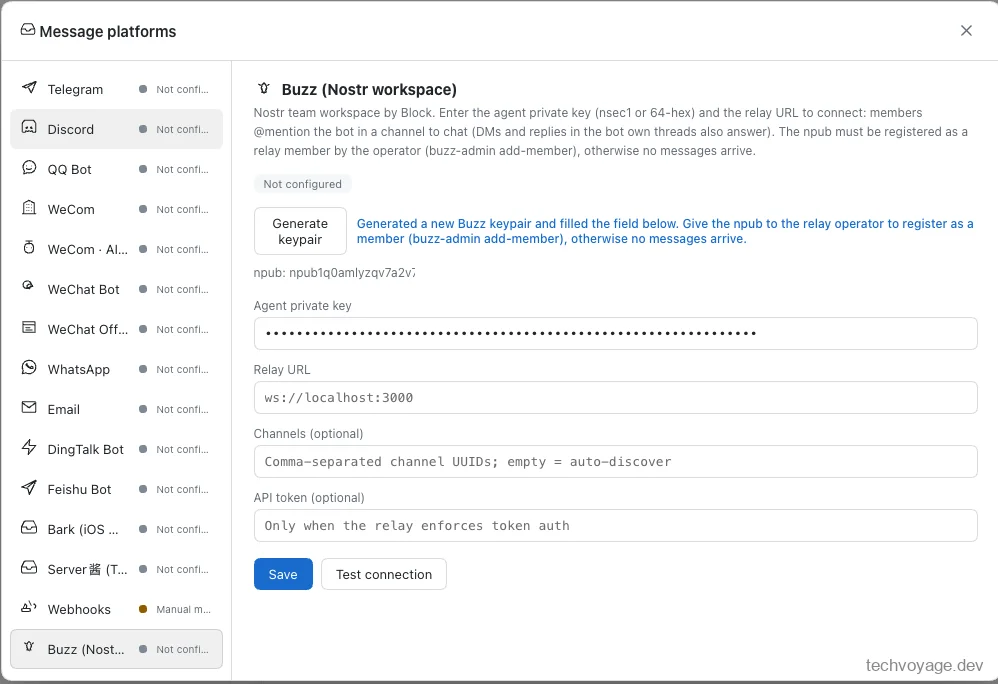 1. Click 'Generate keypair' to generate a Nostr key pair. Copy the `**npub**` public key somewhere safe, as you will need it later. 2. Enter the 'Relay URL' and 'Channels' (the allowlist of channel UUIDs to subscribe to). 3. Click the 'Save' button. Saving the form stores the credentials and **starts the bridge**. The `**nsec**` private key is treated as a secret and stored exclusively in `**~/.dsh/gateway.json**`. ### Registering the DSH Assistant Keypair on the Buzz Nostr Relay**Add the DSH assistant to the relay as a member.** The pubkey will be the `**npub**` generated above:```
docker compose exec relay buzz-admin add-member --pubkey npub123123123
```**Add the DSH assistant to a channel.** Adding a member registers it on the relay, but the member will not yet appear or be searchable within channels. To add the agent to a specific channel using `**buzz-cli**`, note that the `**--pubkey**` parameter must be in **HEX** format, not npub (the `**buzz-admin add-member**` command prints the member's HEX pubkey).```
buzz channels add-member --channel --pubkey --role member
```[**CLI guide****How to Install and Use buzz-cli**
Step-by-step instructions to install and configure buzz-cli for managing Nostr channels, member keys, and AI agent permissions.**5 MIN READ **](https://techvoyage.dev/article/self-hosting-buzz-as-the-workspace-where-ai-agents-become-colleagues#install-buzz-cli) Update the DSH assistant's profile on the Nostr relay to a more meaningful display name using `**buzz-cli**`: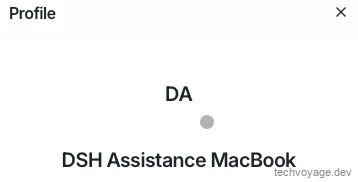 Send a **Wave** (Buzz's DM greeting) to the DSH assistant. The wave comes back: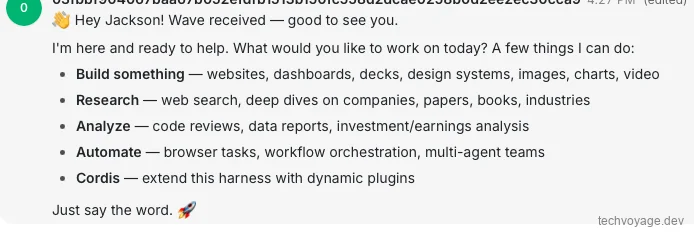_Sending a Wave as a DM to the DSH assistant — the bridge is alive._### Enabling `**/workspace**` Because the `**allowWorkspace**` setting defaults to `**false**`, issuing the `**/workspace**` command is initially rejected: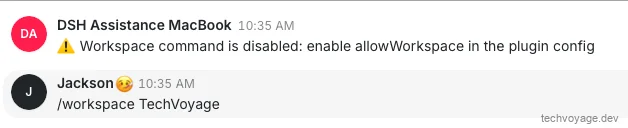 Enable it in `**~/.dsh/profiles/web/cordis.patch.yml**`, then restart `**dsh web**`:```
- id: ui-message-gateway
config:
allowWorkspace: true
``` After the restart: One gotcha: this assumes the workspace folder (`**TechVoyage**` in the screenshots) lives in the default user directory. Specify a full path otherwise. Any new session registered under this workspace via Buzz also appears in the DeepSeek Harness Web UI. ### Available Commands Everything that other supported platforms offer works seamlessly on Buzz: | **Command** | **What it does** |
| --- | --- | | `**/workspace **` | Register an existing folder as the chat's workspace (config-gated) | | `**/help**` | List available commands | | `**/time**` | Current time | | `**/new**` | Start a fresh session | | `**/clear**` | Clear the conversation | | `**/status**` | Bridge status | | `**/stats**` | Chat count + per-bridge status lines (all platforms, incl. Buzz) | | `**/commands**` | Every command descriptor | | `**@path/to/file**` | Works exactly like Web @ mentions — the model reads the file relative to the chat's workspace; a bare `**@**`, `**@prefix**`, or `**/files **` replies with matching files/folders from the same discovery source | | `**/model**` | `**[provider model effort]**` — validated against the live LLM catalog, switches that chat's model + effort; `**/model**` alone lists options, `**/model reset**` restores defaults | | `**/effort**` | `****` adjusts reasoning effort only; `**/effort reset**` restores the default | ### Security in Snapshot - The **nsec** lives only in `**~/.dsh/gateway.json**` (0600, atomic write) — never in `**/gateway/list**`, never in logs. - Every inbound event is **signature-verified** ( `**verifyEvent**`), deduplicated, self-filtered, and mention-gated before it reaches the agent. - **Workspace registration is config-gated** ( `**allowWorkspace: false**` by default) since gateway sessions auto-approve. ## Key Takeaways The harder part of adding Buzz to `**dsh-message-gateway**` was fulfilling the Nostr protocol contract. The existing plugin already provided a architectural foundation for per-chat sessions and command routing, making the bridge integration straightforward. ## References: - [**dsh-message-gateway architecture guide**](https://github.com/a792883583/dsh-message-gateway/blob/main/docs/architecture.md) — extension recipe, module map, security notes (bridges default to hidden) - [**nostr-tools**](https://github.com/nbd-wtf/nostr-tools) — the Nostr library used under the hood - [**deer-flow IM channel connections**](https://github.com/bytedance/deer-flow/blob/main/backend/docs/IM_CHANNEL_CONNECTIONS.md) — reference for IM channel connection patterns [Share](https://api.whatsapp.com/send?text=https%3A%2F%2Ftechvoyage.dev%2Farticle%2Fbringing-buzz-to-deepseek-harness) [Share](https://www.reddit.com/submit?url=https%3A%2F%2Ftechvoyage.dev%2Farticle%2Fbringing-buzz-to-deepseek-harness) [Share](https://www.facebook.com/sharer/sharer.php?u=https%3A%2F%2Ftechvoyage.dev%2Farticle%2Fbringing-buzz-to-deepseek-harness) [Share](https://www.linkedin.com/sharing/share-offsite/?url=https%3A%2F%2Ftechvoyage.dev%2Farticle%2Fbringing-buzz-to-deepseek-harness) [Share](https://x.com/intent/post?url=https%3A%2F%2Ftechvoyage.dev%2Farticle%2Fbringing-buzz-to-deepseek-harness) ## **Related Articles**[**Collaboration****Self-Host Block's Buzz: Shared AI Agent Workspace**
Learn how to self-host Block's Buzz on a Linux VPS behind Cloudflare DNS. Run a secure, Nostr-powered workspace where humans and AI agents collaborate.**16 MIN READ **](https://techvoyage.dev/article/self-hosting-buzz-as-the-workspace-where-ai-agents-become-colleagues) [**AI & Agents****AI Agent Skills: What They Are & How to Create Them**
Discover what AI agent skills are, how progressive disclosure works, and learn to build custom reusable skills.**4 MIN READ **](https://techvoyage.dev/article/ai-agent-skills-what-they-are-how-to-create-them) [**AI & Agents****How to Expose Hermes Agent Privately with Cloudflare WARP**
Learn how to securely expose and access your Hermes Agent globally using Cloudflare WARP and Zero Trust without opening inbound firewall ports.**8 MIN READ **](https://techvoyage.dev/article/exposing-hermes-agent-to-private-network-using-cloudflare-warp) [](https://techvoyage.dev/article/exposing-hermes-agent-to-private-network-using-cloudflare-warp)