---
title: "AI Agent Skills: What They Are & How to Create Them"
canonical_url: "https://techvoyage.dev/article/ai-agent-skills-what-they-are-how-to-create-them"
last_updated: "2026-10-20T09:53:39.913Z"
meta:
description: "Discover what AI agent skills are, how progressive disclosure works, and learn to build custom reusable skills."
"og:description": "Discover what AI agent skills are, how progressive disclosure works, and learn to build custom reusable skills."
"og:title": "AI Agent Skills: What They Are & How to Create Them"
"twitter:description": "Discover what AI agent skills are, how progressive disclosure works, and learn to build custom reusable skills."
"twitter:title": "AI Agent Skills: What They Are & How to Create Them"
---
[Home](https://techvoyage.dev/)
 # **AI Agent Skills: What They Are & How to Create Them**
Discover what AI agent skills are, how progressive disclosure works, and learn to build custom reusable skills.
Jun 26, 2026 -4 MIN READ
[**AI & Agents**](https://techvoyage.dev/category/ai-agents)
Table of contents
## What Is an AI Agent Skill?
An agent skill is a reusable **set of instructions** — a standardised procedure that tells an agent how to do a particular kind of task well. It consists of a single Markdown file, `**SKILL.md**`, and can bundle any other files the task requires, such as reference documents, templates, or executable scripts.
Take the [`**grill-me**`](https://github.com/mattpocock/skills/blob/733d312884b3878a9a9cff693c5886943753a741/skills/productivity/grill-me/SKILL.md) skill as an example:
```
---
name: grill-me
description: Interview the user relentlessly about a plan or design until reaching shared understanding, resolving each branch of the decision tree. Use when user wants to stress-test a plan, get grilled on their design, or mentions "grill me".
---
Interview me relentlessly about every aspect of this plan until we reach a shared understanding. Walk down each branch of the design tree, resolving dependencies between decisions one-by-one. For each question, provide your recommended answer.
Ask the questions one at a time.
If a question can be answered by exploring the codebase, explore the codebase instead.
``` A `**SKILL.md**` file contains a small block of metadata and a body of instructions. The metadata consists of the skill's name and description, which the AI agent loads at startup. ## How AI Agent Skills Work: Progressive Disclosure Initially, only the name and description are loaded into the context. When a user's request matches a skill's description, the body of instructions is loaded into the same context. Let's look at how the [`**grill-me**`](https://github.com/mattpocock/skills/blob/733d312884b3878a9a9cff693c5886943753a741/skills/productivity/grill-me/SKILL.md) skill is used.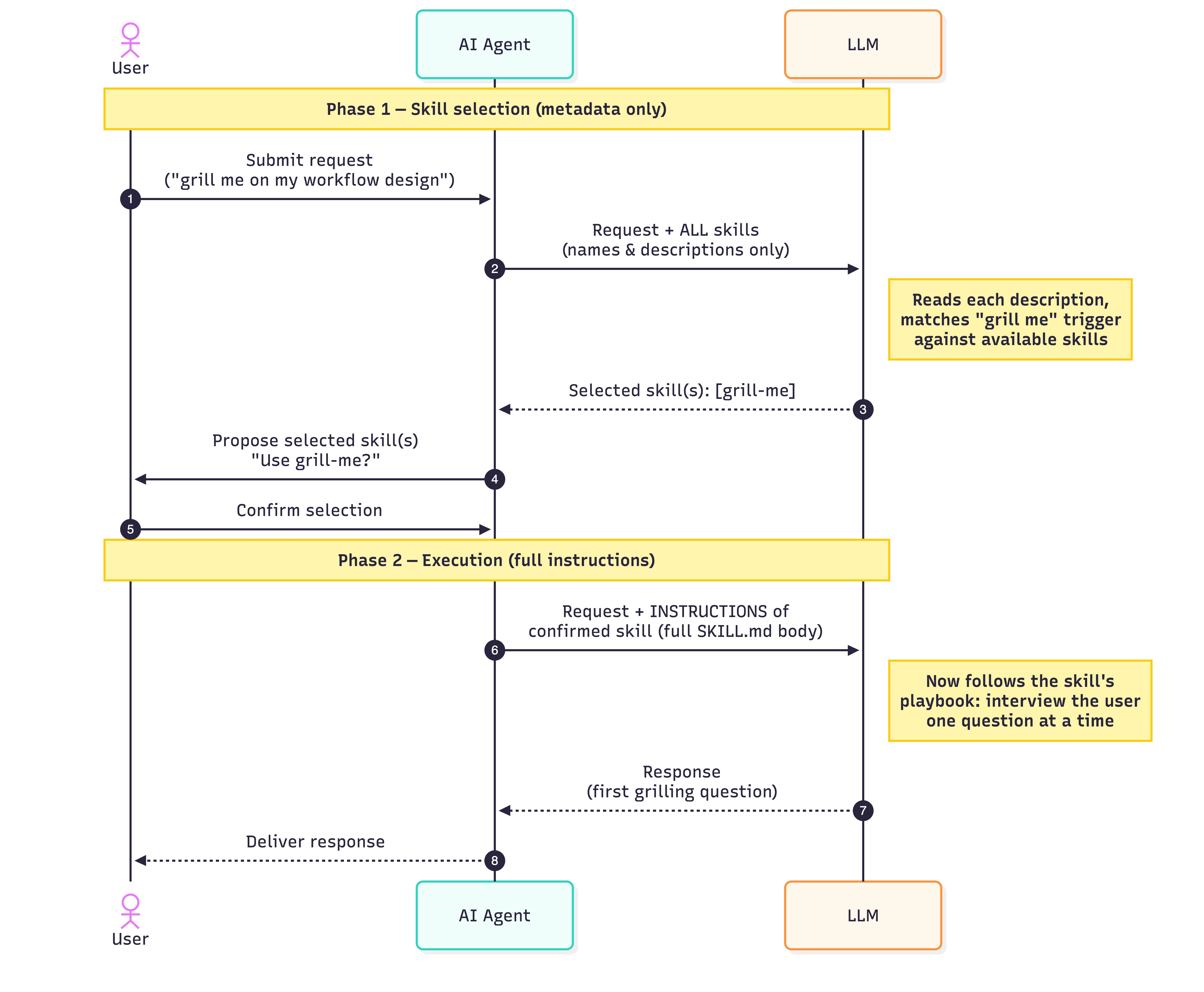 ### Step-by-Step 1. **Request** — The user asks the agent for something ("grill me on my workflow design"). 2. **Selection prompt** — The user's request, along with the descriptions of all available skills, is sent to the LLM. 3. **LLM selects** — The LLM compares the request to each description and returns the skill(s) that match. 4. **Confirmation** — The agent surfaces the proposed skill(s) back to the user, who confirms (or rejects/adjusts) the choice. 5. **Instructions loaded** — The agent fetches the _full_ instructions for the confirmed skill: the `**SKILL.md**` body. 6. **Execution prompt** — The user's request **plus the selected skill's instructions** is sent to the LLM. 7. **Response** — The LLM produces the output, which is the first grilling question. Now let's use [`**excalidraw-diagram-skill**`](https://github.com/coleam00/excalidraw-diagram-skill) to illustrate how a skill with a reference document is used: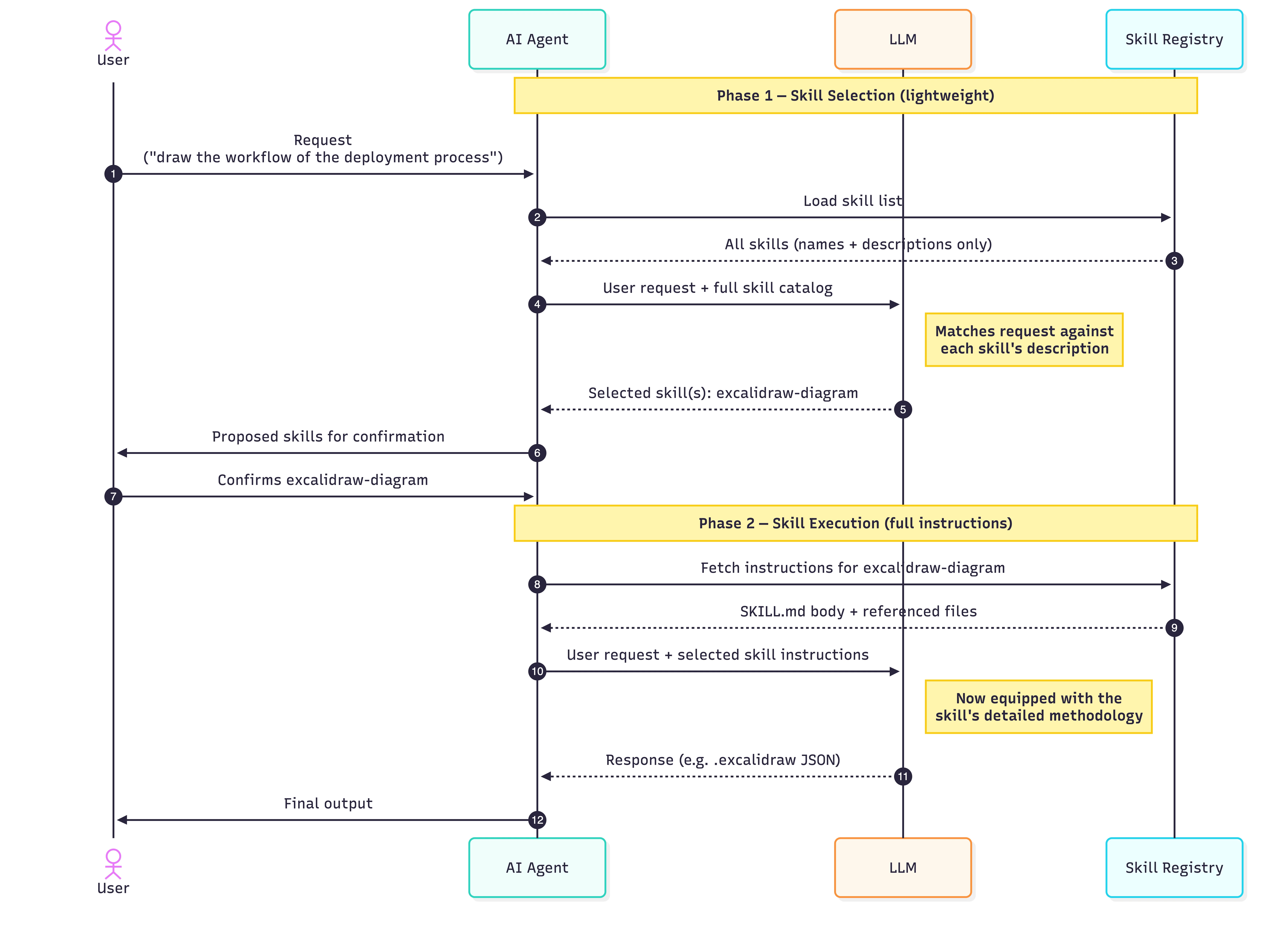 ### Step-by-Step 1. **Request** — The user asks the agent for something ("draw the workflow of the deployment process"). 2. **Selection prompt** — The user's request, along with the descriptions of all available skills, is sent to the LLM. 3. **LLM selects** — The LLM compares the request to each description and returns the skill(s) that match. Here, "draw the workflow" matches the `**excalidraw-diagram**` description, so it is selected. 4. **Confirmation** — The agent surfaces the proposed skill(s) back to the user, who confirms (or rejects/adjusts) the choice. 5. **Instructions loaded** — The agent fetches the _full_ instructions for the confirmed skill: the `**SKILL.md**` body and any referenced files (for `**excalidraw-diagram**`, that includes the colour palette, JSON schema, and element templates). 6. **Execution prompt** — The user's request **plus the selected skill's instructions** is sent to the LLM. The model now has the detailed methodology it needs. 7. **Response** — The LLM produces the output (an `**.excalidraw**` JSON file), which the agent returns to the user. ## AI Agent Skills vs. Tools and MCP Skills don't replace prompts, tools, or MCP. Tools and MCP integrations extend an agent's reach to external systems — querying a database, calling an API, and so on. Skills deepen the agent's know-how for completing a task. An MCP such as the [**NetSuite MCP**](https://techvoyage.dev/article/setup-netsuite-mcp-on-chatgpt-claude) lets an agent answer user questions by accessing live financial and operational data in NetSuite. Then a NetSuite operational-reporting skill, in turn, guides the agent on how to compose that report and present the answer as a report to the user. Some scenarios for using skills include: - Multi-step workflows - Processing documents, such as extracting data from PDFs - Code-generation standards ## How to Create AI Agent Skills 1. **Create a folder** named for the skill (e.g. `**netsuite-operation-report/**`). 2. **Write `**SKILL.md**`** with a `**name**`, a sharp `**description**`, and a concise body of instructions (under 200 words). 3. **Add resources** the task needs — reference docs, templates, scripts. Keep `**SKILL.md**` short and link out to the details. 4. **Install it** where agents will discover it. Refer to [**Solving AI Agent Skills Fragmentation with npx skills**](https://techvoyage.dev/article/centralised-the-skills-for-agents) for how to manage skills across multiple agents. A few tips for writing good skills: - Write the description for the trigger, not the human. - Keep `**SKILL.md**` lean — under 200 words. Put the general case in the body; leave the edge cases to reference documents. - Use scripts for anything deterministic. Don't ask the LLM to do arithmetic. - Version it. Check it into git. ## Conclusion Unlike tools and MCP, which define _what to connect to_, agent skills package _how to do the work_. They are an essential complement, not a replacement. By leveraging progressive disclosure, skills keep your agent's context window clean and efficient — loading detailed instructions, reference documents, and executable scripts only when a user's request triggers them. [Share](https://api.whatsapp.com/send?text=https%3A%2F%2Ftechvoyage.dev%2Farticle%2Fai-agent-skills-what-they-are-how-to-create-them) [Share](https://www.reddit.com/submit?url=https%3A%2F%2Ftechvoyage.dev%2Farticle%2Fai-agent-skills-what-they-are-how-to-create-them) [Share](https://www.facebook.com/sharer/sharer.php?u=https%3A%2F%2Ftechvoyage.dev%2Farticle%2Fai-agent-skills-what-they-are-how-to-create-them) [Share](https://www.linkedin.com/sharing/share-offsite/?url=https%3A%2F%2Ftechvoyage.dev%2Farticle%2Fai-agent-skills-what-they-are-how-to-create-them) [Share](https://x.com/intent/post?url=https%3A%2F%2Ftechvoyage.dev%2Farticle%2Fai-agent-skills-what-they-are-how-to-create-them) ## **Related Articles**[**AI & Agents****Bringing Buzz to DeepSeek Harness: Taught to Speak Nostr**
Integrate DeepSeek Harness with Block Buzz using a Nostr bridge. Configure NIP-42 auth, in-place message streaming, and per-channel agent workspaces.**9 MIN READ **](https://techvoyage.dev/article/bringing-buzz-to-deepseek-harness) [**AI & Agents****How to Expose Hermes Agent Privately with Cloudflare WARP**
Learn how to securely expose and access your Hermes Agent globally using Cloudflare WARP and Zero Trust without opening inbound firewall ports.**8 MIN READ **](https://techvoyage.dev/article/exposing-hermes-agent-to-private-network-using-cloudflare-warp) [**Collaboration****Self-Host Block's Buzz: Shared AI Agent Workspace**
Learn how to self-host Block's Buzz on a Linux VPS behind Cloudflare DNS. Run a secure, Nostr-powered workspace where humans and AI agents collaborate.**16 MIN READ **](https://techvoyage.dev/article/self-hosting-buzz-as-the-workspace-where-ai-agents-become-colleagues) [](https://techvoyage.dev/article/how-to-setup-hermes-on-remote-server) [](https://techvoyage.dev/article/switch-between-multiple-cloudflare-warp-orgs-on-mac)